
JavaScript Trading Controls
StockSharp JS Trading Controls is a set of browser panels for a trading terminal. The package is published on npm as @stocksharp/trading-controls, and all controls can be viewed in the online demo.
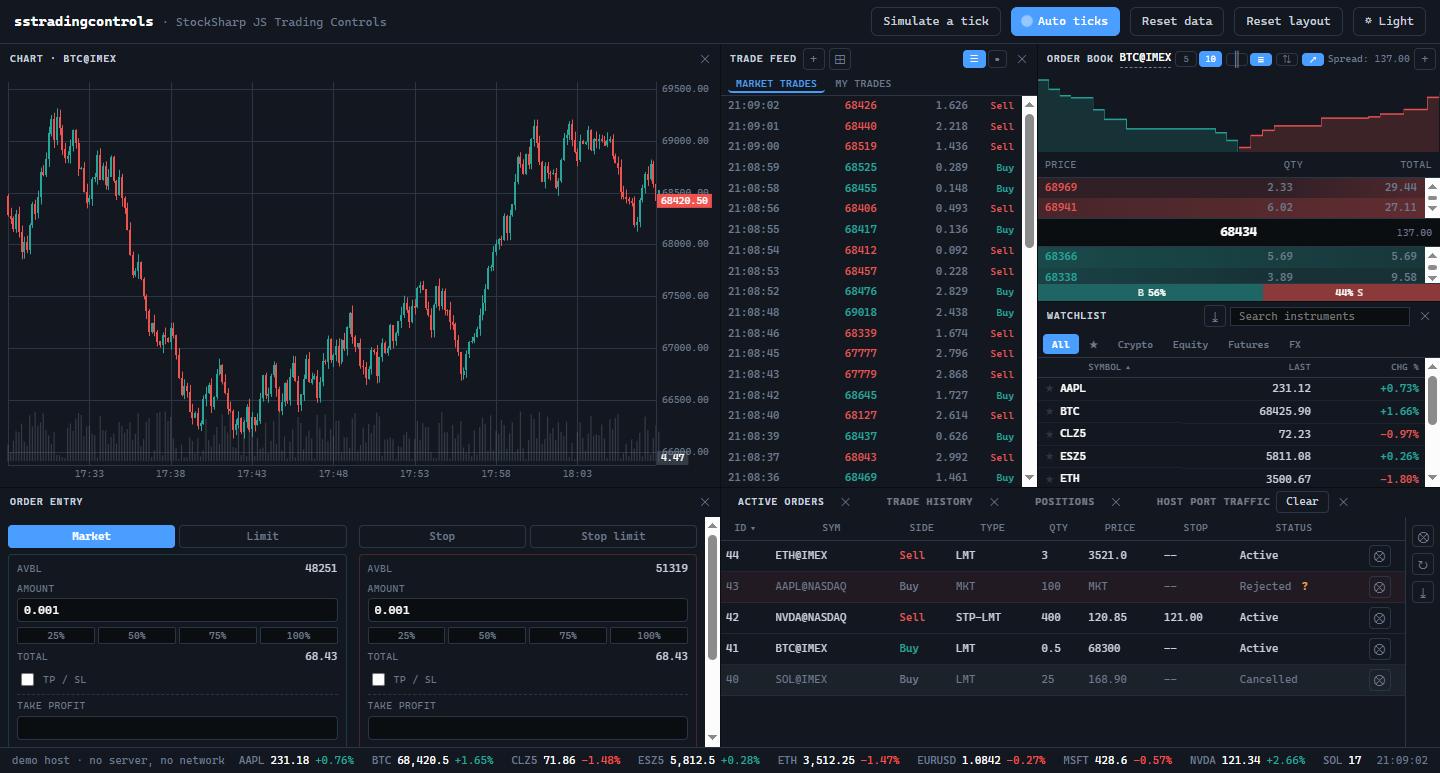
The screenshot also shows a candlestick chart from the separate @stocksharp/chart package. @stocksharp/trading-controls includes seven independent controls:
| Control | Class | Identifier |
|---|---|---|
| Active orders | ActiveOrdersWidget |
activeOrders |
| Positions | PositionsWidget |
positions |
| Trade history | TradeHistoryWidget |
tradeHistory |
| Watchlist | WatchlistWidget |
watchlist |
| Order entry | OrderEntryWidget |
orderEntry |
| Order book | OrderBookWidget |
orderbook |
| Trade feed | TradeFeedWidget |
tradefeed |
The identifier values are available through the exported ControlTypes object.
Installation
npm install @stocksharp/trading-controls
The base styles are required. You can additionally include the ready-made light and dark palette or replace it with your own --t-* CSS variables:
import '@stocksharp/trading-controls/styles.css';
import '@stocksharp/trading-controls/theme.css'; // Optional: ready-made theme.
The controls use Bootstrap Icons classes, but do not bundle the fonts or SVG files. The host page must include the icons separately.
For a page without a bundler, use dist/sstradingcontrols.js, which creates the global window.SSTradingControls object.
Common creation pattern
Each control is created with a static create method. The method validates the host, builds its own DOM, and appends the root element to the supplied container:
import {
  PositionsWidget,
  type TradingHost,
} from '@stocksharp/trading-controls';

declare const host: TradingHost;

const positions = PositionsWidget.create(
  document.querySelector<HTMLElement>('#positions')!,
  {},
  {
    host,
    closePosition: (portfolioId, instrumentId, symbol) =>
      console.log('close', portfolioId, instrumentId, symbol),
    reversePosition: (portfolioId, instrumentId, symbol) =>
      console.log('reverse', portfolioId, instrumentId, symbol),
    refreshPositions: () => console.log('refresh'),
  },
);

positions.update([]);
The second argument is the saved instance state. The dependency set in the third argument differs between controls: for example, the positions panel receives close and reverse handlers, while the order book receives price selection and execution handlers.
TradingHost contract
The controls do not access a global translator, preference store, trading connection, or window manager directly. All external interaction goes through a single TradingHost object.
| Host member | Purpose |
|---|---|
isPrimary |
Identifies the primary instance of a control on the page. |
t(key, ...args) |
Translates visible text and substitutes arguments. |
presentation |
Formats order side, type, and state, profit classes, and the canvas palette. |
preferences, cache |
Store persistent settings and temporary data. |
trading.api |
Searches for instruments and loads executions. |
trading.marketData |
Manages subscriptions and provides active orders. |
trading.portfolioId() |
Returns the current portfolio. |
trading.pickInstrument(...) |
Opens the instrument picker. |
ticker |
Receives visible instruments and their quotes. |
allow(action) |
Checks permission for an action. |
close, spawn, persistState, saveLayout |
Manage panel lifecycle and state. |
register, unregister, broadcast |
Register instances and broadcast changes between them. |
log(message) |
Receives diagnostic messages. |
Every member is required. assertHost validates nested functions before rendering a control and reports the exact missing path. If the application does not need some capabilities, meaningful stubs can be supplied for required commands, such as log: console.warn or an empty saveLayout.
Localization and styling
The controls obtain all visible text exclusively through host.t. The current complete list of 153 keys is shipped in @stocksharp/trading-controls/translation-keys.json. An unknown key is shown to the user as is, so the host must provide translations for the entire list.
The styles.css file contains rules but obtains colors, fonts, and dimensions from --t-* CSS variables. If the ready-made theme.css is not used, the application defines these variables. Canvas colors for the order book and bubble trade feed are returned by host.presentation.canvasPalette().
Releasing resources
Call dispose() when removing a panel. The method removes event handlers, disconnects observers and subscriptions specific to the control when present, and then invokes host.unregister.
positions.dispose();
Building from source
git clone https://github.com/StockSharp/JS-TradingControls.git
cd JS-TradingControls
npm install
npm test
npm run build