
Buy/Sell
The Buy/Sell component is a group of tickets. Each ticket shows the best prices of one instrument and places orders on it for the selected portfolio. A ticket is added with the  button; at the first connection, the panel creates tickets for the first instruments of the venue by itself.

Ticket settings
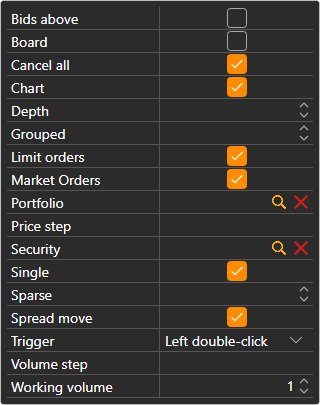
The gear button under a ticket opens its settings: Security, Portfolio, Working volume, the order book Depth, and which blocks the ticket shows:
- Limit orders — the Buy and Sell buttons with a price field between them; the buttons next to the field put the best bid or ask price into it;
- Market Orders — Buy, Sell, Close position and Reverse position at market;
- Cancel all — a button that cancels all orders for the instrument of the ticket.
The instrument of the ticket can be changed by dragging a row from Instruments onto the ticket; if you drag a row from Positions, the ticket takes its instrument and portfolio.
Hotkeys
The ticket of the Buy/Sell panel of the workspace that is open now responds to keys: F9 — buy at market, F10 — sell at market, Esc — cancel all orders. While the cursor is in an input field, the keys do not work.
Warning
F9 and F10 send real market orders to the venue without confirmation.