StockSharp STOCKSHARPDocumentation
English EN
  • EnglishEnglish
  • РусскийРусский
  • 中文中文
  • DeutschDeutsch
  • EspañolEspañol
  • 日本語日本語
  • PortuguêsPortuguês
  • Tutorial
    • Installer
    • Designer
    • Terminal
      • Installing Terminal
      • Update to the new version
      • Quick start
      • User interface
        • Main menu
        • Workspace
        • Working with tables
        • Status bar
        • Logs
        • Portfolios
        • Board editor
        • Risk management
        • Components
          • Instruments
          • Level 1
          • Buy/Sell
          • Order book
          • Level 2
          • Chart
          • P&L chart
          • Trades
          • Orders
          • Positions
          • Trades feed
          • News
          • Positions (options)
          • Option desk
          • Smile volatility
          • Order log
      • Connection settings
      • Market data storage
      • Indicators
      • Notifications
      • Settings
    • Hydra
    • Hydra server
    • Telegram services
    • Runner
    • API
    • Shell
    • Store
    • MATLAB
    • UDP Dumper
    • Connecting AI agents (MCP)
    • Common
  • Strategy examples
  • Designer schemas
  • Designer lessons
  • Class list

No matches

Home / Tutorial / Terminal / User interface / Components / Trades feed

Trades feed

The Terminal trades feed displays market trades for selected instruments. The shared tick trades guide explains the instrument filter of this component.
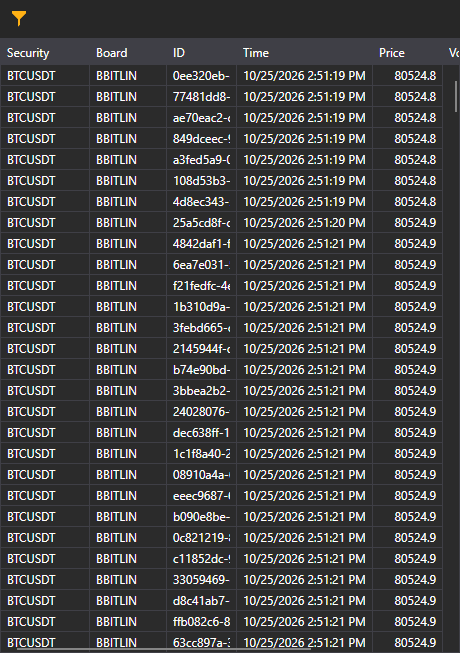
Terminal trades feed 00

See

Tick trades

← Previous Positions Next → News
S#
STOCKSHARP

Trading platform documentation: connectors, strategies, Designer, Hydra and the StockSharp API.

© 2026 StockSharp. All rights reserved.

Documentation

  • Designer
  • Hydra
  • Installer
  • API

StockSharp

  • Website
  • Store
  • GitHub
  • Community chat

Resources

  • Home
  • Sitemap
  • Offline PDF