
Connecting a Hydra Client
In server mode, it's possible to connect another Hydra program, which will act as a client and download data to itself. Unlike Connecting via FIX protocol, data is transmitted in the form of files in StockSharp format. This makes the source suitable for transferring a large volume of historical data.
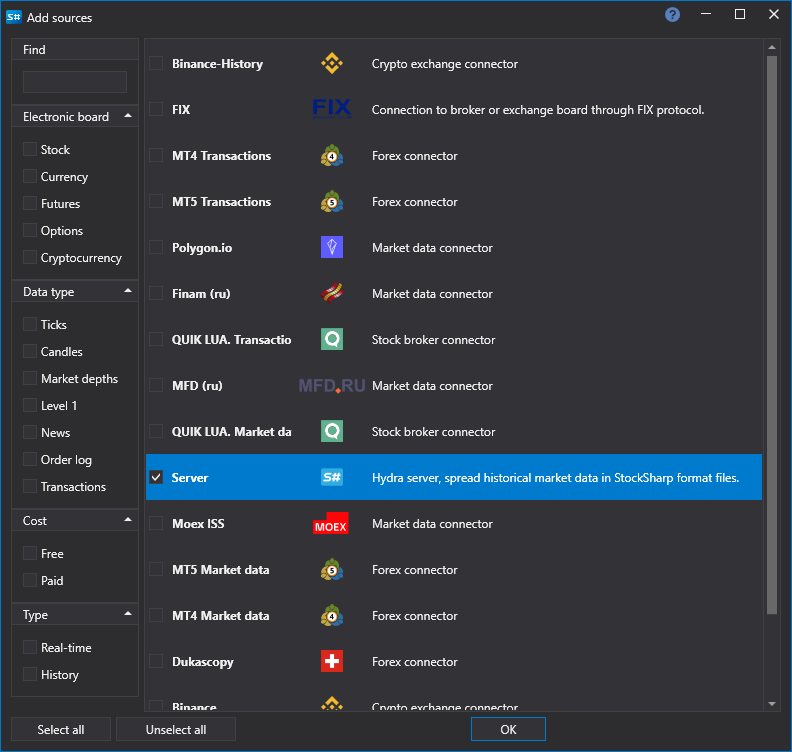
The Server source is used for connection: mark it in the window that opens with the + button of the Sources section and click Add selected.
Settings
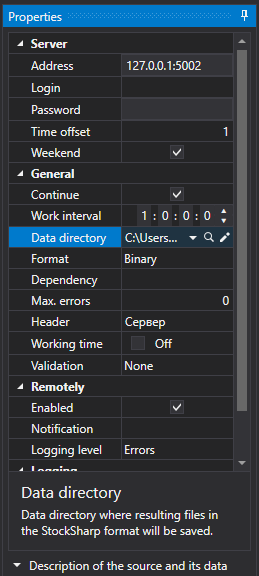
Server
- Address - the address of the Hydra server.
- Login - login (required if the server requires authorization).
- Password - password (required if the server requires authorization).
- Time Offset - a time offset in days from the current date, necessary to prevent downloading incomplete data for the current trading session.
- Weekend - whether to skip weekends.
Main
- Continue - continue downloading from the last downloaded date.
- Interval of Operation - operation interval.
- Data Directory - the directory with data where the final files in S# format will be saved.
- Format - the format of data: BIN/CSV.
- Max. Errors - the maximum number of errors, upon reaching which the task will be stopped. By default, 0 - the number of errors is ignored.
- Title - the title of the task.
- Working Hours - the work schedule of the task.
- Validation - what to do with data that has not passed validation: nothing, delete it or stop the subscription.
Remotely
- Enabled - control the task remotely.
- Notification - the channel to which notifications about the task arrive.
- Logging level - which task messages to send to the channel.
Logging
- Logging Level - the level of logging.