StockSharp STOCKSHARPDocumentation
English EN
  • EnglishEnglish
  • РусскийРусский
  • 中文中文
  • DeutschDeutsch
  • EspañolEspañol
  • 日本語日本語
  • PortuguêsPortuguês
  • Tutorial
    • Installer
    • Designer
      • Videos
      • Resources for Learning
      • Installing Designer
      • Update to the new version
      • Quick start
      • User interface
        • Ribbon
        • Workspace
        • Schemas
        • Logs
        • Portfolios
        • Boards
        • Risk management
        • Commissions
        • Components
          • Chart
          • Orders
          • Trades
          • Order book
          • Positions
          • Statistics
          • P&L equity
          • Backtesting settings
          • Live settings
          • Tick trades
      • Strategies
      • Indicators
      • Backtesting
      • Optimization
      • Market data storage
      • Live execution
      • Connections settings
      • Strategy gallery
      • Export Import
      • Settings
    • Terminal
    • Hydra
    • Hydra server
    • Telegram services
    • Runner
    • API
    • Shell
    • Store
    • MATLAB
    • UDP Dumper
    • Connecting AI agents (MCP)
    • Common
  • Strategy examples
  • Designer schemas
  • Designer lessons
  • Class list

No matches

Home / Tutorial / Designer / User interface / Components / Trades

Trades

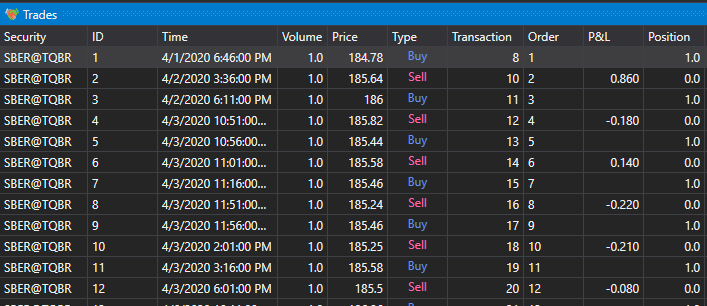
The Trades component is a table with trades, which displays complete information about all trades of the strategy:

Designer The transaction 00

Recommended content

P&L equity

← Previous Orders Next → Order book

In this article

  • Recommended content
S#
STOCKSHARP

Trading platform documentation: connectors, strategies, Designer, Hydra and the StockSharp API.

© 2026 StockSharp. All rights reserved.

Documentation

  • Designer
  • Hydra
  • Installer
  • API

StockSharp

  • Website
  • Store
  • GitHub
  • Community chat

Resources

  • Home
  • Sitemap
  • Offline PDF