
Portfolios
To work with portfolios there is the Portfolios panel. You can open it by clicking the Portfolios button in the Common tab.
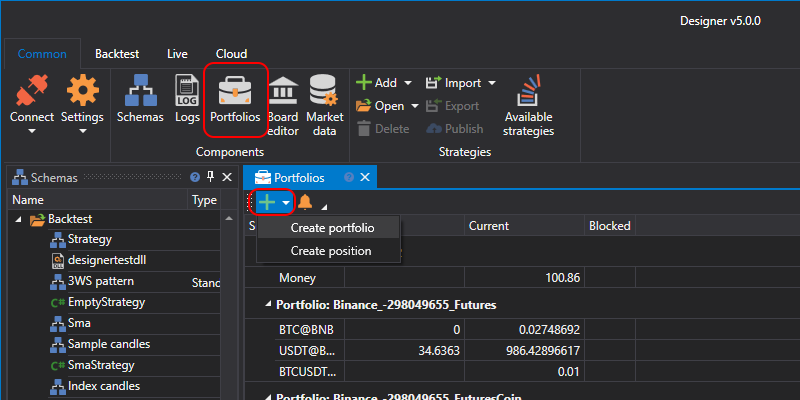
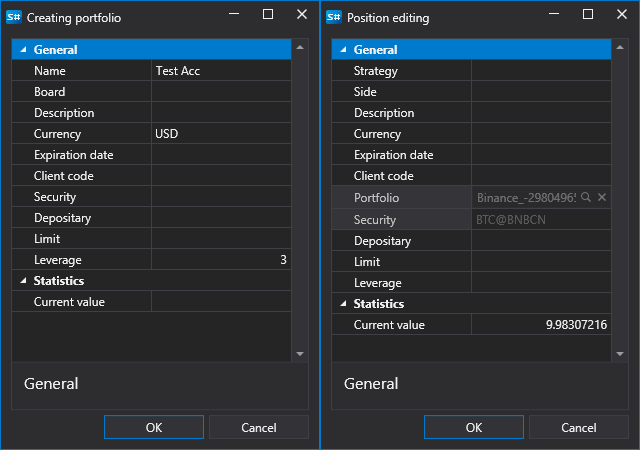
The Portfolios panel is a table that shows the basic data on the portfolio, and the current positions for these portfolios. By double-clicking on the portfolio or position, the Creating portfolio window or the Creating position window appears in which you can edit the selected portfolio or position. To create a new portfolio or a new position, you should click the  button and select the appropriate item in the drop-down menu.
A right-click on a row opens a menu with the Edit, Close position, Reverse position, Withdraw and Hide zero balances items; they are described on the Terminal Portfolios page.