
Backtesting settings
The emulation settings are opened with the Emulator button on the Backtest tab of the Ribbon when a strategy is open for backtesting or for optimization. When you select a property, its detailed description appears at the bottom of the window. The properties are grouped:
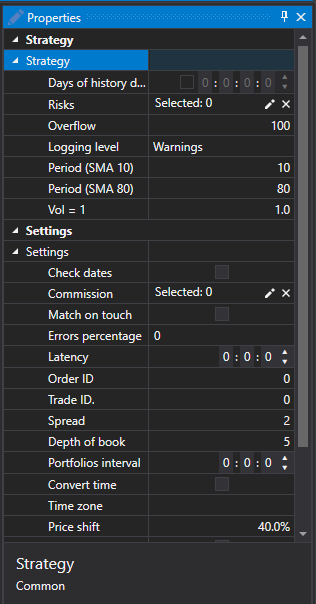
Backtest
- Check dates – to check whether the loaded days are trading days.
- Commission – the commission (brokerage, exchange, etc.).
Backtesting (extra)
- Candle – at which candle price orders are executed when the test runs on candles: middle, open, high, low or close.
- Combine on touch – during emulation, combine orders when the trade price touches the order price (i.e., equal to the order price).
- Errors percentage – the percentage value of the error in registering new orders. The value can be from 0 (there will be no errors) to 100.
- Latency – the minimum value of the registered order latency.
- Order ID – the number from which the emulator will generate identifiers for orders.
- Trade ID – the number from which the emulator will generate identifiers for trades.
- Spread – the spread size in the price steps. It is used in specifying the spread for the generation of an order book from tick trades.
- Depth of book – the maximum depth of the order book that will be generated from the ticks.
- Portfolios interval – the interval for portfolio recalculation. If the interval is zero, no recalculation is performed.
- Change time – to change time for orders and trades into exchange time.
- Time Zone – the time zone of the exchange.
- Price shift – the price shift from the last trade, specifying the limits of the maximum and minimum prices for the next session.
- Add extra volume – add extra volume to the order book when orders with large volume are being registered.
- Centred spread – to split the spread equally around prices for which it is unknown which side traded (for example, prices from candles), so that a buy and a sell pay the same half of the spread.
- Session state – to check the trading state.
- Money – to check the cash balance.
- Shortable – whether short positions can be opened.
- Storage – to allow saving the messages that the emulator creates.
The testing period, the instrument, the market data storage and its format are set on the Backtest tab itself (User interface), and the scheme parameters are set on the Strategy parameters panel at the right edge of the strategy tab.