
User interface
To run the test on the history, you shall select a strategy, the scheme of which will be tested on the history. The strategy is selected on the Schemas panel in the strategy folder, by double clicking on the strategy of interest. When you select a strategy for the workspace, a new tab with a strategy appears, when you switch to this tab, the Backtest tab will automatically open in the Ribbon.
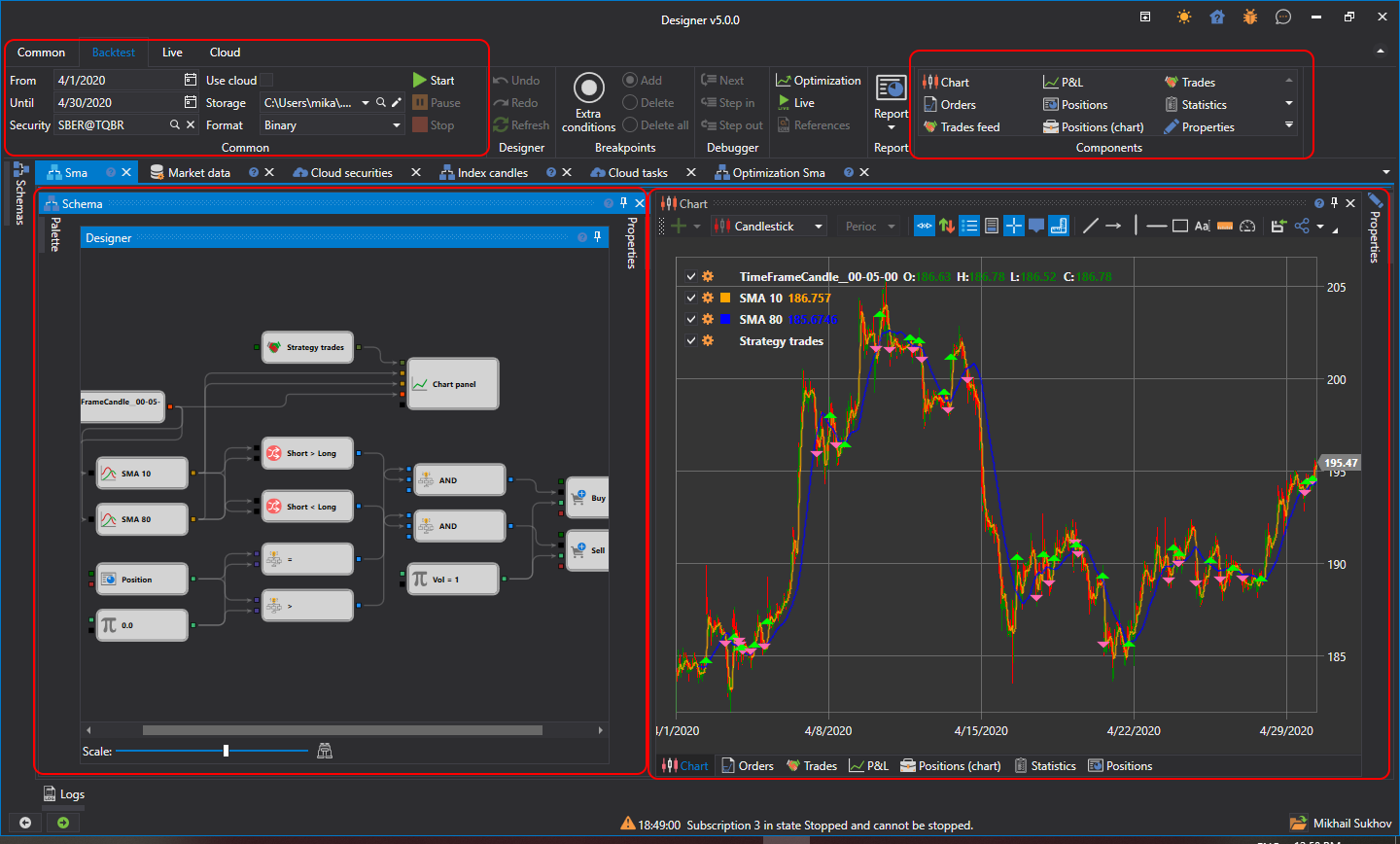
The Common group of the Backtest tab sets the testing period (From and To), the Security, the market data storage (Storage) and the format it is written in (Format). The Cloud checkbox runs the testing in the StockSharp cloud instead of on this computer.
The strategy for testing is started by clicking the Start button  . After starting the strategy for testing, the Pause
 button, suspending the testing, and the Stop
 button, completely stopping the testing, become active. When editing the strategy, the buttons Undo (Ctrl+Z)
 , canceling the last action, Redo (Ctrl+Y)
 , returning what was undone, and Refresh (Ctrl+R)
 , completely updating the scheme, are useful.
The other buttons of the tab:
- Open — open the same strategy for optimization or for trading;
- Emulator — emulation settings;
- Report — a report on the completed test in Excel, JSON, XML or CSV format;
- the Components group — components that can be added to the strategy tab: chart, P&L, trades and others.
The Debugger — breakpoints and step-by-step execution — is located on the Scheme panel.
The selected strategy tab contains the following panels by default:
- The Scheme panel, in which the main working process on the strategy and its components design is performed, by combining cubes and connecting lines. The Scheme is described in detail in the Diagram panel section.
- Panels of information components — Chart, Orders, Trades, P&L, Positions (chart), Statistics, Positions — as tabs under the scheme.
- The Strategy parameters panel, collapsed by default at the right edge of the strategy tab: the scheme parameters that can be changed before the start.