
Settings Directory
The following directories are important for Designer:
The directory where Designer is installed. From this folder, you can start Designer by running Designer.exe, or update Designer by running Designer.Update.exe. Deleting this directory removes Designer, but Designer settings are not deleted.
The Designer settings directory is located under the user's documents folder: …\StockSharp\Designer\ (for example, c:\Users\User\Documents\StockSharp\Designer\). Deleting this directory resets all Designer settings to their defaults. All created strategies, downloaded instruments, and other information stored in the settings directory will be DESTROYED.
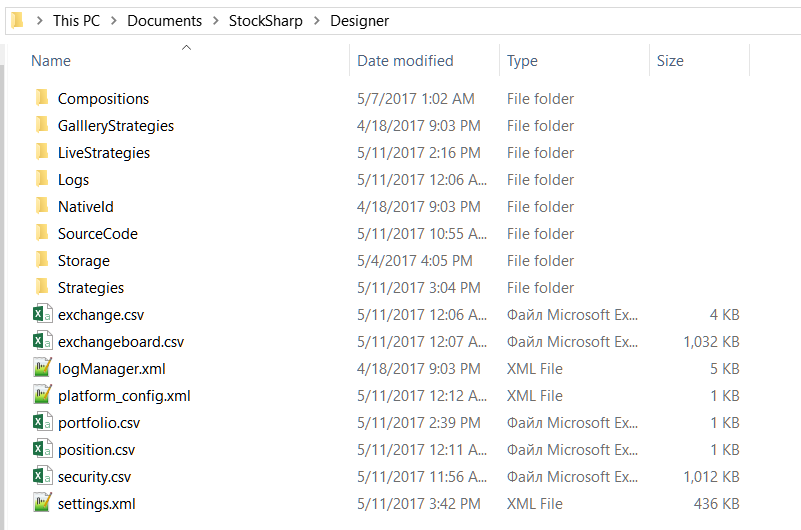
This directory contains the following folders and files:
- Compositions stores, as XML files, all blocks from the Composite elements folder on the Schemas panel. Deleting files from this directory removes the corresponding Composite element from the Composite elements folder on the Schemas panel. Do not edit these files manually; doing so may break the corresponding Composite elements block.
- LiveStrategies stores, as XML files, all blocks from the Trading folder on the Schemas panel. Deleting files from this directory removes the strategy from the Trading folder on the Schemas panel. Do not edit these files manually; doing so may break the corresponding strategy.
- Logs contains all Designer crash logs, which simplifies troubleshooting Designer.
- SourceCode stores, as XML files, all blocks from the Source code folder on the Schemas panel. Deleting files from this directory removes the Source code block from the Source code folder on the Schemas panel. Do not edit these files manually; doing so may break the corresponding Source code block.
- Strategies stores, as XML files, all blocks from the Strategies folder on the Schemas panel. Deleting files from this directory removes the strategy from the Strategies folder on the Schemas panel. Do not edit these files manually; doing so may break the corresponding strategy. If you manually add a strategy file to this folder and restart Designer, the strategy appears in the Strategies folder on the Schemas panel.
- Storage contains market data downloaded by Designer to the corresponding Market data storage. The folder is created when Market data storage is created, and the default path points to this folder. Deleting this folder removes all downloaded market data from the corresponding storage. If the storage contains CSV files, they can be edited in a standard text editor or MS Excel. BIN files cannot be edited manually.
- exchange.csv and exchangeboard.csv contain the list of exchanges, instrument codes, and trading modes. These files can be edited in a standard text editor or MS Excel.
- security.csv contains all received and created instruments across all sources. Deleting this file removes all instruments from Designer. Adding new instruments is described in Download instruments and Create instrument. This file can be edited in a standard text editor or MS Excel.
- portfolio.csv and position.csv contain all received and created portfolios and their current positions. Deleting these files removes the corresponding data from Designer. If Designer receives portfolio information on each connection, position information can still be lost permanently. These files can be edited in a standard text editor or MS Excel.
- settings.json contains current settings. Designer creates this file when settings change or when the program closes. Deleting this file resets current settings to defaults. Do not edit this file manually; doing so may break Designer.
Before manually editing individual files or resetting Designer settings, make backup copies of the files you change or of the entire directory.