
Optimization Parameters
Optimization is performed on strategy parameters that have the following types:
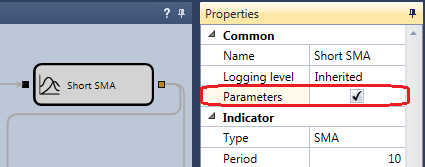
By default, all parameters with these types appear in the optimizer parameters table. To exclude a parameter from optimization:
- For a diagram, select the required cube, open its properties, switch to Advanced settings, and turn off the Parameter checkbox:
- In the case of code, you need to write code when defining a parameter and change the CanOptimize property:
_long = this.Param(nameof(Long), 80);
_short = this.Param(nameof(Short), 20);

// turn off param for optimization
_long.CanOptimize = false;
After changing the available optimization parameters, reopen the optimization panel.