
Real-time
The Real-time tab manages the strategies launched in trading.
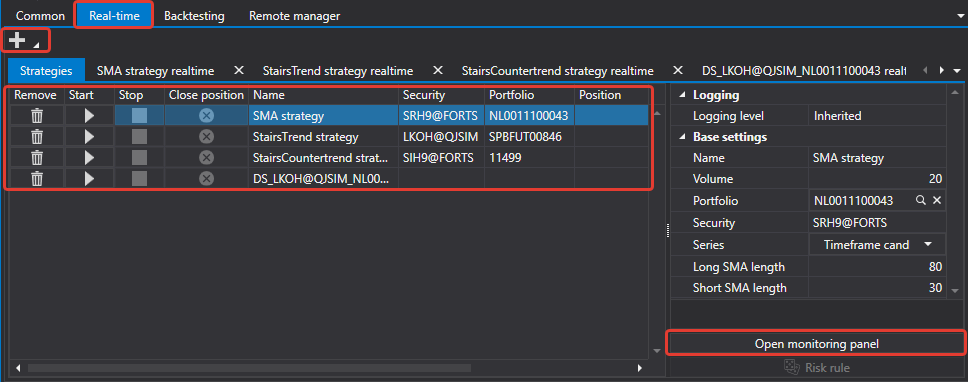
The area consists of three parts:
- Strategies — the table of all strategies of the area and the buttons for managing them, at the top;
- Strategy — the parameters of the selected strategy, on the left;
- the tabs on the right — Chart, Statistics, P&L, Orders and Own trades: everything the selected strategy shows, has placed and has executed.
Working with this area is possible only when a connection is established: without it, the buttons are unavailable, and a hint about it is shown under the table.
Buttons
| Button | What it does |
|---|---|
| Refresh | reads the list of strategies again |
| Add | opens the strategy selection window |
| Remove | removes the selected strategy from the area |
| Start | starts the selected strategy in trading |
| Stop | stops it |
Strategies table
Each row is one strategy. The columns show its state and result:
| Column | What it shows |
|---|---|
| State | stopped, starting, running, stopping |
| Action | starting, stopping and closing the position right from the row |
| Online | whether the strategy receives real-time data |
| Trading | the trading mode of the strategy |
| Name | the name set when it was added |
| Portfolio, Security | what it trades on |
| Position | the current position |
| Order count, Number of trades | how many orders have been placed and how many trades have been executed |
| P&L change, P&L (chart) | profit and loss and their dynamics |
| Realized profit, Unrealized profit | the closed and the open part of the result |
| Error | the last error of the strategy, if there was one |
Adding a strategy
The Add button opens a window with the list of available strategies.
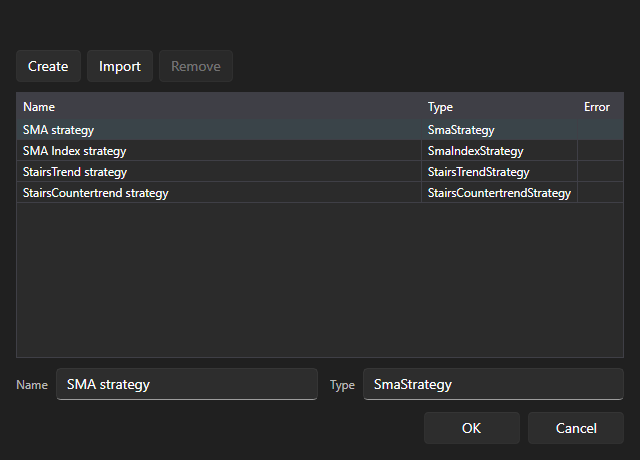
The window lists the four bundled strategies and everything that has been imported from Designer. The Import button adds a scheme exported from Designer to this list; the Create button adds a blank for your own strategy; the Remove button removes the selected entry from the list.
After clicking OK, the strategy appears in the table, and its parameters open on the Strategy panel: the instrument, portfolio, volume, risk rules and the strategy's own parameters — for example, the moving average lengths and the candle time frame for SMA strategy.