
Optimization
The Optimization tab selects the strategy parameters by iteration: it runs the same strategy on the same history as many times as there are combinations of parameters, and shows the result of each run.
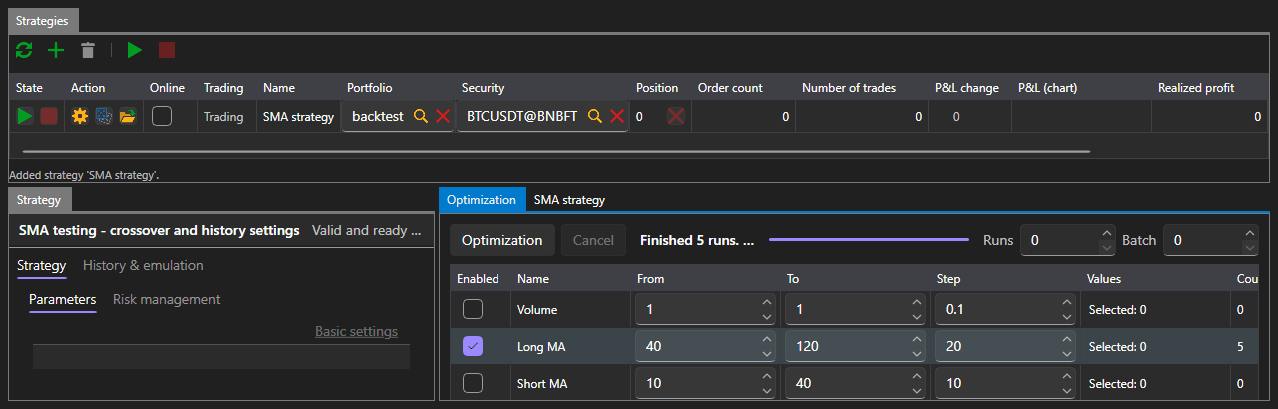
Optimization is available only in the Emulation area. Real-time does not have this tab: there is nothing to iterate parameters with on a live connection.
What to iterate
The parameter table lists the parameters of the selected strategy that can be iterated. A parameter takes part in the iteration only when it is checked; for a checked one, the start, the end and the step are set. What exactly can be entered depends on the parameter type: an integer has integer values, a boolean has only two values.
The iteration bounds are set to the right of the buttons:
| Field | What it sets |
|---|---|
| Runs | the maximum number of runs to make; 0 means no limit |
| Batch | how many runs to execute at the same time |
The number of combinations is recalculated as the parameters are checked, so you can see in advance what the iteration will amount to.
Iteration progress
The Optimization button starts the iteration, and Cancel stops it. The status line says what is happening: the iteration is being planned, so many runs are being executed, the iteration has stopped after so many runs, the iteration has not produced a single run. The bar next to it shows how much has been passed.
Result
The result is shown in three ways at the same time:
- a table where each row is one run with its parameter values, final profit and equity curve;
- a surface over two selected parameters;
- the same surface as a heat map.
Selecting a row in the table shows the equity curve of that run.