
StockSharp STOCKSHARPDocumentation
English EN
  • EnglishEnglish
  • РусскийРусский
  • 中文中文
  • DeutschDeutsch
  • EspañolEspañol
  • 日本語日本語
  • PortuguêsPortuguês
  • Tutorial
    • Installer
    • Designer
    • Terminal
    • Hydra
    • Hydra server
    • Telegram services
    • Runner
    • API
      • Setup
      • AI-Assisted Development
      • Examples
      • Connectors
        • Graphical configuration
        • Russia
        • Stock market
        • Forex
          • MetaTrader
          • DXtrade
            • Configuration DXtrade
            • Graphical configuration DXtrade
            • Adapter initialization DXtrade
          • cTrader
          • Deriv
          • DukasCopy
          • DukasCopy JForex
          • FXCM
          • FXOpen TickTrader
          • LMAX
          • MetaApi
          • Oanda
          • Match-Trader
          • StocksTrader
          • Finage
          • TraderMade
          • X Open Hub
        • Crypto exchanges
        • DEX
        • HFT
        • Common
        • Creating own connector
        • Save and load settings
        • Reconnection settings
        • OAuth
        • Async API
        • IFileSystem and Paths
        • Subscription Lifecycle
      • Market data
      • Orders management
      • Instruments
      • Market-data storage
      • Candles
      • Indicators
      • Patterns
      • Position Management
      • Adapter Routing
      • Order books
      • Strategies
      • Commissions
      • Profit and Loss (PnL)
      • Slippage
      • Latency
      • Logging
      • Options
      • Testing
      • Data Export
      • Data Import
      • Analytics Scripts
      • Desktop controls
      • JavaScript
    • Shell
    • Store
    • MATLAB
    • UDP Dumper
    • Connecting AI agents (MCP)
    • Common
  • Strategy examples
  • Designer schemas
  • Designer lessons
  • Class list

No matches

Home / Tutorial / API / Connectors / Forex / DXtrade / Graphical configuration DXtrade

Graphical Configuration of DXtrade

For all S\# products, graphical configuration of the connection is performed in the Connection Settings Window:
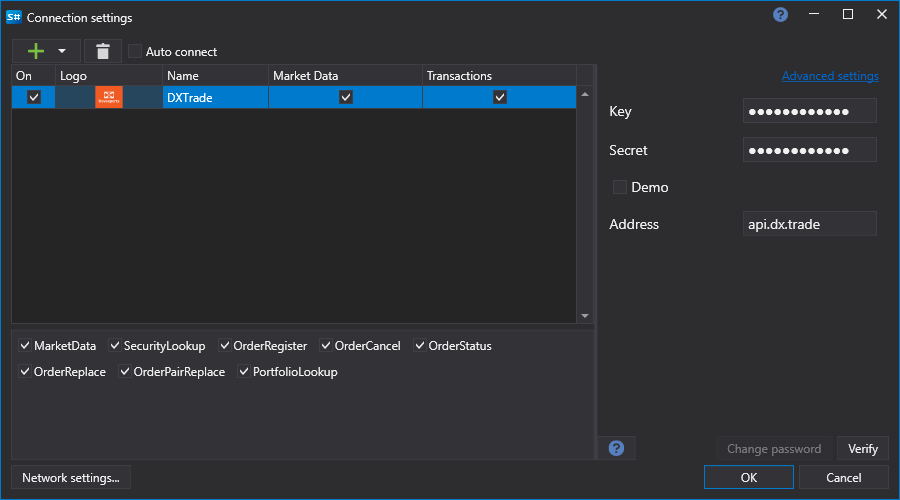
API GUI Settings DXtrade

  • Key - Key.
  • Secret - Secret.
  • Demo - Connection to demo trading.

See also

Connectors

Graphical Configuration

Creating Your Own Connector

Save and Load Settings

← Previous Configuration DXtrade Next → Adapter initialization DXtrade

In this article

  • See also
S#
STOCKSHARP

Trading platform documentation: connectors, strategies, Designer, Hydra and the StockSharp API.

© 2026 StockSharp. All rights reserved.

Documentation

  • Designer
  • Hydra
  • Installer
  • API

StockSharp

  • Website
  • Store
  • GitHub
  • Community chat

Resources

  • Home
  • Sitemap
  • Offline PDF