
订单簿
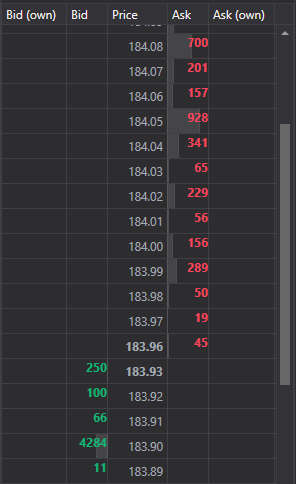
MarketDepthControl - 一个用于显示订单簿的图形组件。该组件允许显示报价和自己的订单。
主要属性和方法
- MarketDepthControl.MaxDepth - 订单簿深度。
- MarketDepthControl.IsBidsOnTop - 将出价显示在顶部。
- MarketDepthControl.UpdateFormat(StockSharp.BusinessEntities.Security security ) - 使用该交易品种更新价格和成交量显示格式。
- MarketDepthControl.ProcessOrder(StockSharp.BusinessEntities.Order order, System.Decimal price, System.Decimal balance, StockSharp.Messages.OrderStates state ) - 处理订单。
- MarketDepthControl.UpdateDepth(StockSharp.Messages.IOrderBookMessage message, StockSharp.BusinessEntities.Security security ) - 使用消息更新订单簿。
以下是展示其用法的代码片段:
<Window x:Class="SampleBarChart.QuotesWindow"
	xmlns="http://schemas.microsoft.com/winfx/2006/xaml/presentation"
	xmlns:x="http://schemas.microsoft.com/winfx/2006/xaml"
	xmlns:xaml="http://schemas.stocksharp.com/xaml"
	Title="QuotesWindow" Height="600" Width="280">
	<xaml:MarketDepthControl x:Name="DepthCtrl" x:FieldModifier="public" />
</Window>
public class MarketDepthWindow
{
	private readonly Connector _connector;
	private readonly Security _security;
	private Subscription _depthSubscription;

	public MarketDepthWindow(Connector connector, Security security)
	{
		InitializeComponent();

		_connector = connector;
		_security = security;

		// 配置订单簿格式
		DepthCtrl.UpdateFormat(security);

		// 订阅订单簿接收事件
		_connector.OrderBookReceived += OnMarketDepthReceived;

		// 为所选交易品种创建订单簿订阅
		_depthSubscription = new Subscription(DataType.MarketDepth, security);

		// 启动订阅
		_connector.Subscribe(_depthSubscription);
	}

	// 订单簿接收事件处理器
	private void OnMarketDepthReceived(Subscription subscription, IOrderBookMessage depth)
	{
		// 检查订单簿是否属于我们的订阅
		if (subscription != _depthSubscription)
			return;

		// 在用户界面线程中更新订单簿
		this.GuiAsync(() => DepthCtrl.UpdateDepth(depth, _security));
	}

	// 窗口关闭时取消订阅的方法
	public void Unsubscribe()
	{
		if (_depthSubscription != null)
		{
			_connector.OrderBookReceived -= OnMarketDepthReceived;
			_connector.UnSubscribe(_depthSubscription);
			_depthSubscription = null;
		}
	}
}
在订单簿中显示自己的订单
public class MarketDepthWithOrdersWindow
{
	private readonly Connector _connector;
	private readonly Security _security;

	public MarketDepthWithOrdersWindow(Connector connector, Security security)
	{
		InitializeComponent();

		_connector = connector;
		_security = security;

		// 配置订单簿格式
		DepthCtrl.UpdateFormat(security);

		// 订阅订单簿和订单接收事件
		_connector.OrderBookReceived += OnMarketDepthReceived;
		_connector.OrderReceived += OnOrderReceived;

		// 创建订单簿订阅
		var depthSubscription = new Subscription(DataType.MarketDepth, security);
		_connector.Subscribe(depthSubscription);

		// 如有必要,创建订单订阅
		var ordersSubscription = new Subscription(DataType.Transactions, null);
		_connector.Subscribe(ordersSubscription);
	}

	// 订单簿接收事件处理器
	private void OnMarketDepthReceived(Subscription subscription, IOrderBookMessage depth)
	{
		if (depth.SecurityId != _security.ToSecurityId())
			return;

		// 在用户界面线程中更新订单簿
		this.GuiAsync(() => DepthCtrl.UpdateDepth(depth, _security));
	}

	// 订单接收事件处理器
	private void OnOrderReceived(Subscription subscription, Order order)
	{
		if (order.Security != _security)
			return;

		// 在订单簿中显示订单
		this.GuiAsync(() => DepthCtrl.ProcessOrder(
			order,
			order.Price,
			order.Balance,
			order.State));
	}
}
从订单簿获取最佳价格
// 从订单簿获取最佳价格的方法
public (decimal? BestBid, decimal? BestAsk) GetBestPrices(IOrderBookMessage depth)
{
	if (depth == null)
		return (null, null);

	var bestBid = depth.GetBestBid()?.Price;
	var bestAsk = depth.GetBestAsk()?.Price;

	return (bestBid, bestAsk);
}

// 使用该方法显示价差
private void OnMarketDepthReceived(Subscription subscription, IOrderBookMessage depth)
{
	if (depth.SecurityId != _security.ToSecurityId())
		return;

	// 获取最佳价格
	var (bestBid, bestAsk) = GetBestPrices(depth);

	// 计算并显示价差
	if (bestBid.HasValue && bestAsk.HasValue)
	{
		var spread = bestAsk.Value - bestBid.Value;
		var spreadPercent = bestBid.Value > 0 ? spread / bestBid.Value * 100 : 0;

		this.GuiAsync(() =>
		{
			SpreadLabel.Content = $"价差: {spread:F2} ({spreadPercent:F2}%)";
		});
	}

	// 更新订单簿
	this.GuiAsync(() => DepthCtrl.UpdateDepth(depth, _security));
}