
K线
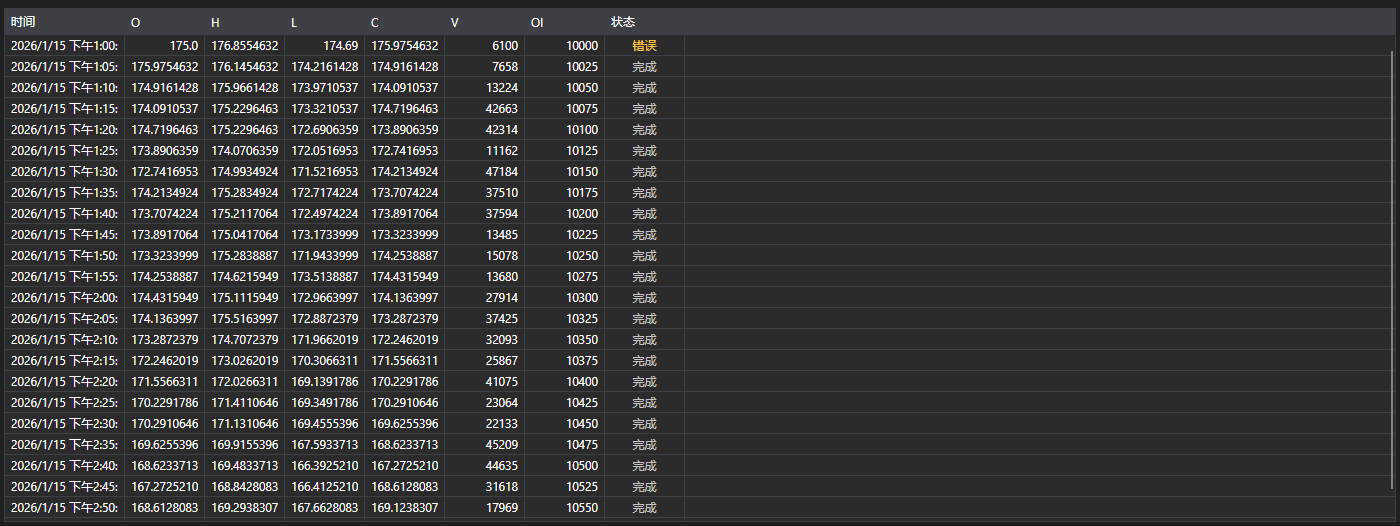
CandleMessageGrid - K线表格。显示每根K线的开盘价、最高价、最低价、收盘价、成交量、持仓量和状态。
主要属性
- CandleMessageGrid.Messages - K线列表。
- CandleMessageGrid.SelectedMessage - 选中的K线。
- CandleMessageGrid.SelectedMessages - 选中的多根K线。
K线状态
State 列按 CandleStates 的值着色,截图中三种状态都能看到:
- Active - K线仍在形成。之所以高亮,是因为它的数值还会变化: 这样的K线不能当作已完成的来读。
- Finished - K线已收盘,数值已最终确定。中性颜色,表中大多数行都是这种。
- None - 没有收到状态。表格标记为 错误 并按警告着色: 这不是空值,而是数据不完整的标志。
因此,第一行显示 错误 的K线订阅报告的是数据源的问题,而不是一根没有状态的K线。
以下是使用示例代码片段:
<Window x:Class="Sample.CandlesWindow"
	xmlns="http://schemas.microsoft.com/winfx/2006/xaml/presentation"
	xmlns:x="http://schemas.microsoft.com/winfx/2006/xaml"
	xmlns:xaml="http://schemas.stocksharp.com/xaml"
	Title="K线" Height="400" Width="800">
	<xaml:CandleMessageGrid x:Name="CandleGrid" x:FieldModifier="public" />
</Window>
public class CandlesWindow
{
	private readonly Connector _connector;
	private readonly Security _security;
	private Subscription _candleSubscription;

	public CandlesWindow(Connector connector, Security security)
	{
		InitializeComponent();

		_connector = connector;
		_security = security;

		// 订阅K线接收事件
		_connector.CandleReceived += OnCandleReceived;

		// 创建五分钟K线订阅
		_candleSubscription = new Subscription(TimeSpan.FromMinutes(5).TimeFrame(), security);

		// 启动订阅
		_connector.Subscribe(_candleSubscription);
	}

	// K线接收处理程序
	private void OnCandleReceived(Subscription subscription, ICandleMessage candle)
	{
		// 检查该K线是否属于我们的订阅
		if (subscription != _candleSubscription)
			return;

		// 在界面线程中把K线加入表格
		this.GuiAsync(() => CandleGrid.Messages.Add((CandleMessage)candle));
	}

	// 关闭窗口时取消订阅
	public void Unsubscribe()
	{
		if (_candleSubscription != null)
		{
			_connector.CandleReceived -= OnCandleReceived;
			_connector.UnSubscribe(_candleSubscription);
			_candleSubscription = null;
		}
	}
}
仅已完成的K线
K线在收盘前会多次到达,每次更新表格都会增长。如果只关心最终数值,请按状态过滤:
private void OnCandleReceived(Subscription subscription, ICandleMessage candle)
{
	if (subscription != _candleSubscription)
		return;

	// 跳过所有仍在形成的K线
	if (candle.State != CandleStates.Finished)
		return;

	this.GuiAsync(() => CandleGrid.Messages.Add((CandleMessage)candle));
}
就地更新当前K线
若要让当前K线留在表中并被更新而不是重复添加,在K线收盘前替换最后一行:
private void OnCandleReceived(Subscription subscription, ICandleMessage candle)
{
	if (subscription != _candleSubscription)
		return;

	var message = (CandleMessage)candle;

	this.GuiAsync(() =>
	{
		var last = CandleGrid.Messages.LastOrDefault();

		// 与最后一行是同一根K线 - 直接替换
		if (last != null && last.OpenTime == message.OpenTime)
			CandleGrid.Messages[CandleGrid.Messages.Count - 1] = message;
		else
			CandleGrid.Messages.Add(message);
	});
}
加载历史K线
// 加载历史K线
public void LoadHistoricalCandles(Security security, TimeSpan timeFrame, DateTime from, DateTime to)
{
	// 清空当前K线
	CandleGrid.Messages.Clear();

	// 创建历史K线订阅
	var historySubscription = new Subscription(timeFrame.TimeFrame(), security)
	{
		MarketData =
		{
			// 指定请求历史数据的时间段
			From = from,
			To = to
		}
	};

	_connector.CandleReceived += OnCandleReceived;
	_connector.Subscribe(historySubscription);
}