
Candles
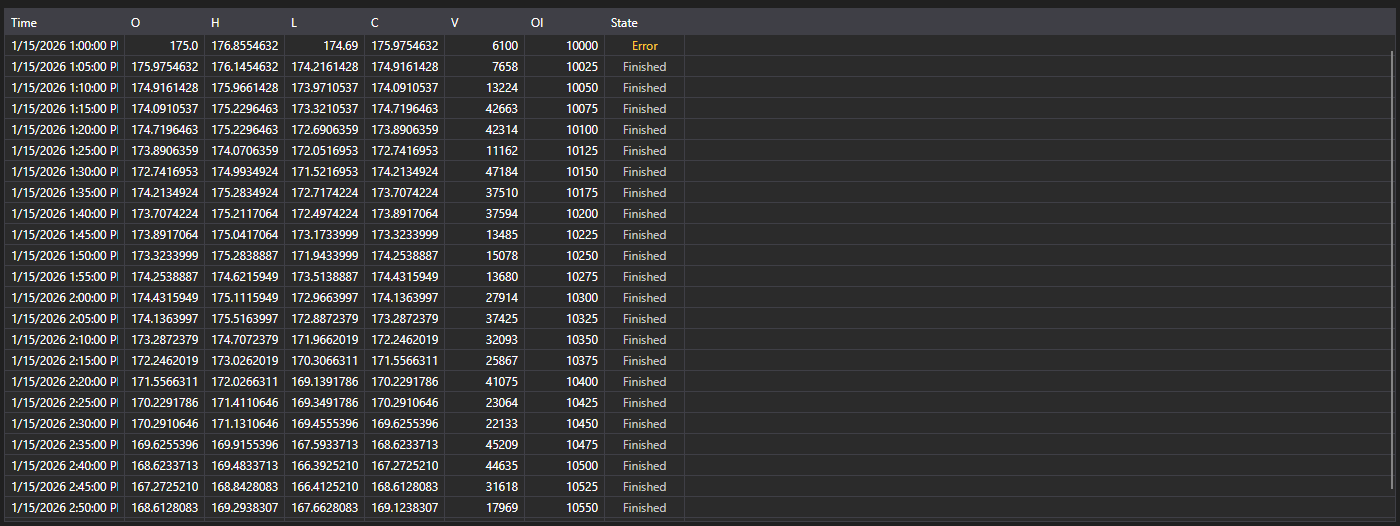
CandleMessageGrid - a candle table. It shows the open, high, low and close prices, the volumes, the open interest and the state of every candle.
Main properties
- CandleMessageGrid.Messages - list of candles.
- CandleMessageGrid.SelectedMessage - selected candle.
- CandleMessageGrid.SelectedMessages - selected candles.
Candle states
The State column is coloured by the CandleStates value, and the screenshot shows all three:
- Active - the candle is still forming. It is highlighted because its values keep changing: such a candle must not be read as a closed one.
- Finished - the candle is closed and its values are final. A neutral colour, and most rows in the table are this.
- None - no state arrived. The table labels it Error and tones it as a warning: this is not an empty value but a sign that the data came in incomplete.
So a candle subscription showing Error in its first row is reporting a problem with the data source, not a candle without a state.
Below are code fragments demonstrating its usage:
<Window x:Class="Sample.CandlesWindow"
	xmlns="http://schemas.microsoft.com/winfx/2006/xaml/presentation"
	xmlns:x="http://schemas.microsoft.com/winfx/2006/xaml"
	xmlns:xaml="http://schemas.stocksharp.com/xaml"
	Title="Candles" Height="400" Width="800">
	<xaml:CandleMessageGrid x:Name="CandleGrid" x:FieldModifier="public" />
</Window>
public class CandlesWindow
{
	private readonly Connector _connector;
	private readonly Security _security;
	private Subscription _candleSubscription;

	public CandlesWindow(Connector connector, Security security)
	{
		InitializeComponent();

		_connector = connector;
		_security = security;

		// Subscribe to the candle received event
		_connector.CandleReceived += OnCandleReceived;

		// Create a subscription to five-minute candles
		_candleSubscription = new Subscription(TimeSpan.FromMinutes(5).TimeFrame(), security);

		// Start the subscription
		_connector.Subscribe(_candleSubscription);
	}

	// Candle received handler
	private void OnCandleReceived(Subscription subscription, ICandleMessage candle)
	{
		// Check that the candle belongs to our subscription
		if (subscription != _candleSubscription)
			return;

		// Add the candle to the table on the user interface thread
		this.GuiAsync(() => CandleGrid.Messages.Add((CandleMessage)candle));
	}

	// Unsubscribe when the window closes
	public void Unsubscribe()
	{
		if (_candleSubscription != null)
		{
			_connector.CandleReceived -= OnCandleReceived;
			_connector.UnSubscribe(_candleSubscription);
			_candleSubscription = null;
		}
	}
}
Finished candles only
Until a candle closes it arrives many times, so the table grows on every update. When only the final values matter, filter by state:
private void OnCandleReceived(Subscription subscription, ICandleMessage candle)
{
	if (subscription != _candleSubscription)
		return;

	// Skip everything that is still forming
	if (candle.State != CandleStates.Finished)
		return;

	this.GuiAsync(() => CandleGrid.Messages.Add((CandleMessage)candle));
}
Updating the current candle in place
To keep the current candle in the table and update it instead of adding it again, replace the last row until the candle closes:
private void OnCandleReceived(Subscription subscription, ICandleMessage candle)
{
	if (subscription != _candleSubscription)
		return;

	var message = (CandleMessage)candle;

	this.GuiAsync(() =>
	{
		var last = CandleGrid.Messages.LastOrDefault();

		// The same candle as the last row - replace it
		if (last != null && last.OpenTime == message.OpenTime)
			CandleGrid.Messages[CandleGrid.Messages.Count - 1] = message;
		else
			CandleGrid.Messages.Add(message);
	});
}
Loading historical candles
// Load historical candles
public void LoadHistoricalCandles(Security security, TimeSpan timeFrame, DateTime from, DateTime to)
{
	// Clear the current candles
	CandleGrid.Messages.Clear();

	// Create a subscription to historical candles
	var historySubscription = new Subscription(timeFrame.TimeFrame(), security)
	{
		MarketData =
		{
			// Set the period the historical data is requested for
			From = from,
			To = to
		}
	};

	_connector.CandleReceived += OnCandleReceived;
	_connector.Subscribe(historySubscription);
}