
Statistics
StatisticsWidget is a table of strategy statistics: profit, drawdown, trade counts, latencies. The panel is read-only: one row per parameter, with rows grouped by the area the parameter belongs to.
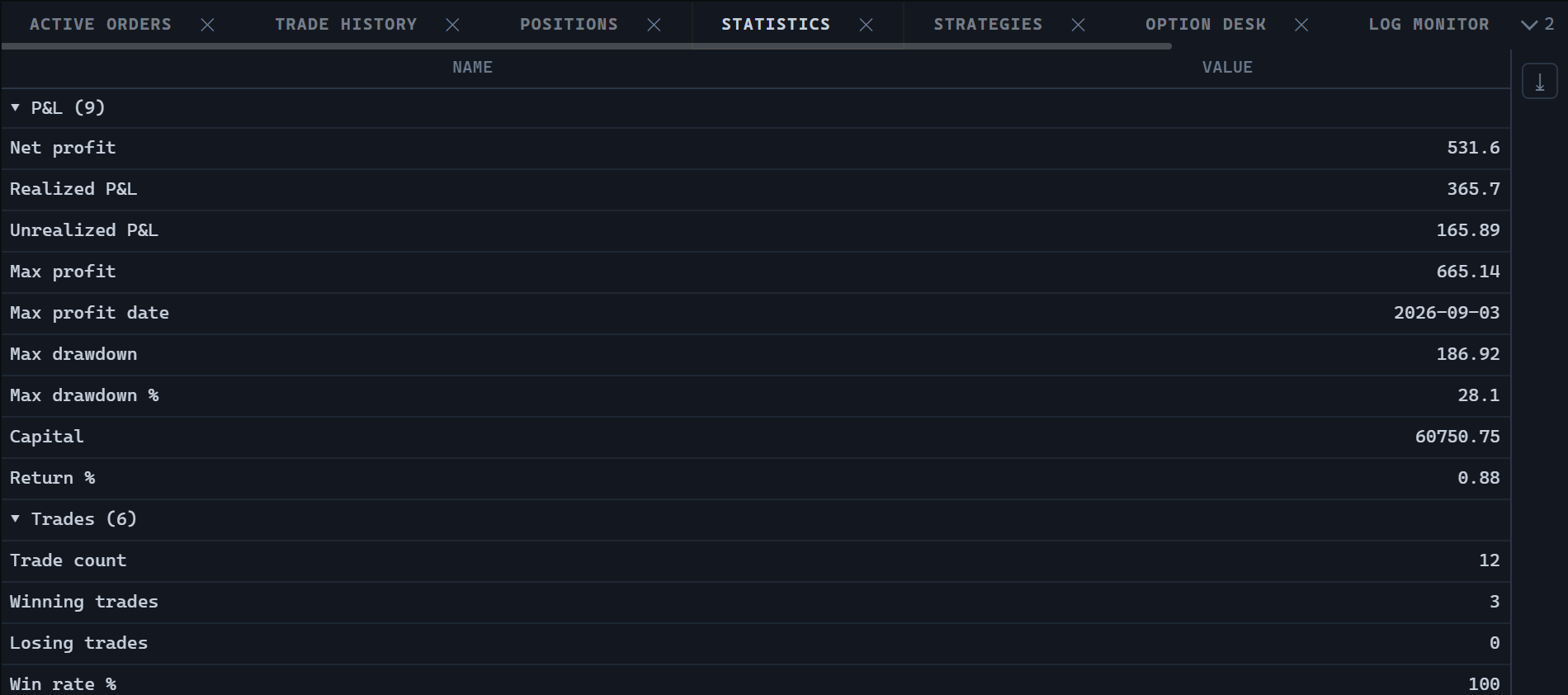
Creating and updating
import {
  StatisticsWidget,
  type TradingHost,
} from '@stocksharp/trading-controls';

declare const host: TradingHost;

const statistics = StatisticsWidget.create(
  document.querySelector<HTMLElement>('#statistics')!,
  {},
  { host },
);

statistics.update([
  {
    key: 'NetProfit',
    category: 'pnl',
    categoryText: 'Profit',
    order: 1,
    name: 'Net profit',
    description: 'Result of the run',
    value: 11_055.75,
  },
  {
    key: 'MaxProfitDate',
    category: 'pnl',
    categoryText: 'Profit',
    order: 2,
    name: 'Maximum date',
    value: '2024-03-26T07:30:00Z',
  },
  {
    key: 'NetProfit',
    category: 'pnl',
    categoryText: 'Trades',
    order: 100,
    name: 'Trade count',
    value: 1_340,
  },
]);
The StatisticsDeps set consists of a single mandatory field, host. The control has no action handlers: statistics are produced by the strategy, and there is nothing in the panel to cancel, reload, or edit. The second argument of create is the saved panel state; the control does not use it.
update replaces the whole set of rows at once. A strategy publishes its parameters as a single table, so a row that disappears from the set is treated as having ceased to exist rather than having stopped changing. Row identity is defined by the key field.
Rows and order
A row is described by the StatisticRow type:
| Field | Purpose |
|---|---|
key |
Stable identifier of the parameter. |
category |
Group key, independent of the language. |
categoryText |
Group caption for display. When absent, category is used. |
order |
Position of the parameter in the registry. |
name |
Localized parameter name. |
description |
Localized explanation, shown as a tooltip on the name cell. |
value |
A number, a date, or a string. null means the parameter has not been measured yet. |
The desktop version of the table obtains its rows by reflecting over the strategy parameters; the browser has no such mechanism, so rows arrive from the host ready-made — with the name and description already translated.
Grouping is done by category, not by categoryText: grouping by a translated caption would rebuild the table whenever the language changed. The group order is set by the smallest order among its parameters, so profit comes above drawdown, and drawdown above trade counters. Sorting by name or by value would separate parameters that are meant to be read together.
Two columns are visible: Name and Value. The category and order columns are declared but hidden — they are needed for grouping and sorting and tell the reader nothing. Only the two visible columns take part in the export.
Value formatting
The text of the value cell is produced by the exported formatStatistic(value) function:
import { formatStatistic } from '@stocksharp/trading-controls';

formatStatistic(11_055.756); // '11055.76'
formatStatistic(1_340);      // '1340'
formatStatistic('2024-03-26T07:30:00Z'); // '2024-03-26'
formatStatistic(null);       // ''
A number is rounded to two decimals and shown without trailing zeros. A date shows the day only: parameters of this kind describe the run as a whole, and the time in them would be noise. A string is recognized as a date only when it starts with YYYY-MM-DD; otherwise it stays text. A missing value produces an empty cell rather than a zero, which would read as a measured result.
Sorting works on the original value, so a number sorts as a number, not as a string.
What the control does and what the host does
The control takes all visible text from the host through host.t, including column captions, the panel title, the empty-table caption, and the table context menu items. The close button calls host.close, and the export writes the table out to XLSX. On creation the instance registers itself through host.register, and on dispose it is removed through host.unregister.
The control keeps no settings of its own in host.preferences. It requests no data: the rows are supplied by the host through update.
The panel type identifier is available as StatisticsWidget.TYPE and equals ControlTypes.Statistics.
Public methods
StatisticsWidget.create(hostEl, state, deps)— create the panel in the given container.update(rows)— replace the whole set of statistics rows.dispose()— release resources.
The panel also supports sorting, multiple row selection, a context menu, and exporting to XLSX.