
Log monitor
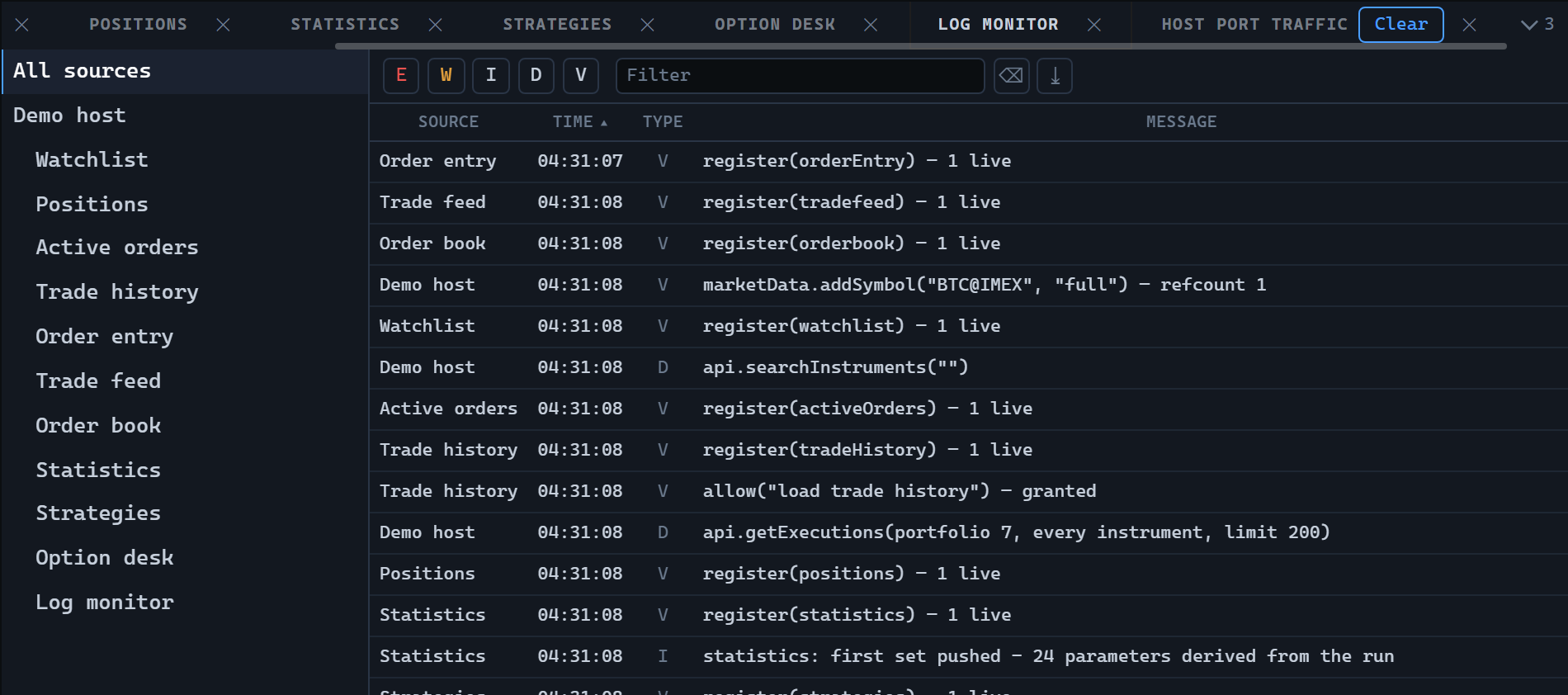
LogMonitorWidget shows the operation log: a tree of sources on the left, and on the right a table of messages for the selected source and its whole subtree. A message is stored once and carries the identifier of the source that wrote it, and the number of stored rows is capped.
Creating and updating
import {
  LogLevels,
  LogMonitorWidget,
  type TradingHost,
} from '@stocksharp/trading-controls';

declare const host: TradingHost;

const log = LogMonitorWidget.create(
  document.querySelector<HTMLElement>('#log')!,
  {},
  {
    host,
    maxMessages: 20_000,
  },
);

log.setSources([
  { id: 'connector', name: 'Connector' },
  { id: 'strategy-1', name: 'SMA', parentId: 'connector' },
]);

log.append([{
  id: 1,
  time: Date.now(),
  level: LogLevels.Warning,
  sourceId: 'strategy-1',
  message: 'Order rejected: not enough funds',
}]);

log.select('connector');
Of the dependencies only host is mandatory: a log is written to, not acted upon, so the control needs no handlers. The rest are optional:
| Dependency | Default | Purpose |
|---|---|---|
maxMessages |
5000 |
How many messages to keep. Extra ones are dropped from the start of the list. |
chrome |
true |
Whether to draw the control's own title bar with a close button. A host that captions and closes the panel itself (through a dock tab, for instance) passes false. |
sources |
true |
Whether to show the source tree on creation. This is the initial state only: the tree comes back from the table context menu or through a showSources call. |
setSources passes the source list as a whole: a source that disappears is removed from the tree, and the selection falls back to "all sources". append adds what has just been written, and clear forgets all messages, leaving the source tree in place.
The static LogMonitorWidget.TYPE property holds the control identifier logMonitor.
Sources and filters
A source declares its parent (parentId), not its children, and may arrive before that parent. The tree is built from whatever has arrived already: a source with an unknown parent becomes a root, and a cycle is broken at its first node. The tree rows are flat, with nesting shown by indentation; the top row selects all sources at once.
Three filters are in effect at the same time: the set of enabled levels, a case-insensitive search string over the message text, and the selected source subtree. Levels are toggled with toolbar buttons — error, warning, info, debug, verbose from the LogLevels object; in the narrow column the level is shown as the letter E, W, I, D, V. The visible method returns what is left after all the filters.
The table consists of source, time, level, and message columns, is sorted by time in ascending order, and supports multiple selection, sorting, column hiding, filters, and a context menu. The menu carries an extra item that shows the source tree. A toolbar button exports the visible rows to XLSX; the export carries the time formatted by host.presentation.timeText and the full level name rather than the letter.
What the host does
The control takes the translations (host.t), the time format (host.presentation.timeText), and the panel close handling (host.close) from the host, and registers itself through host.register, unregistering in dispose. It keeps no settings of its own in host.preferences and saves no instance state: the second argument of create is accepted for uniformity but never read. Collecting the messages, delivering them, and restoring the panel position are up to the host.
Public methods
setSources(sources)— replace the source list.append(messages)— add messages, respecting themaxMessagescap.clear()— clear the messages.select(sourceId)— show the source subtree;nullshows everything.visible()— the messages left after all the filters.sourcesShown()— whether the source tree is shown.showSources(on)— show or hide the tree; the selected source filter is kept.dispose()— release resources.