
JavaScript Grids
StockSharp JS Grids is a set of browser components for displaying tabular data. The package is published on npm as @stocksharp/grids, has no third-party runtime dependencies, and can be used both with TypeScript and directly in the browser.
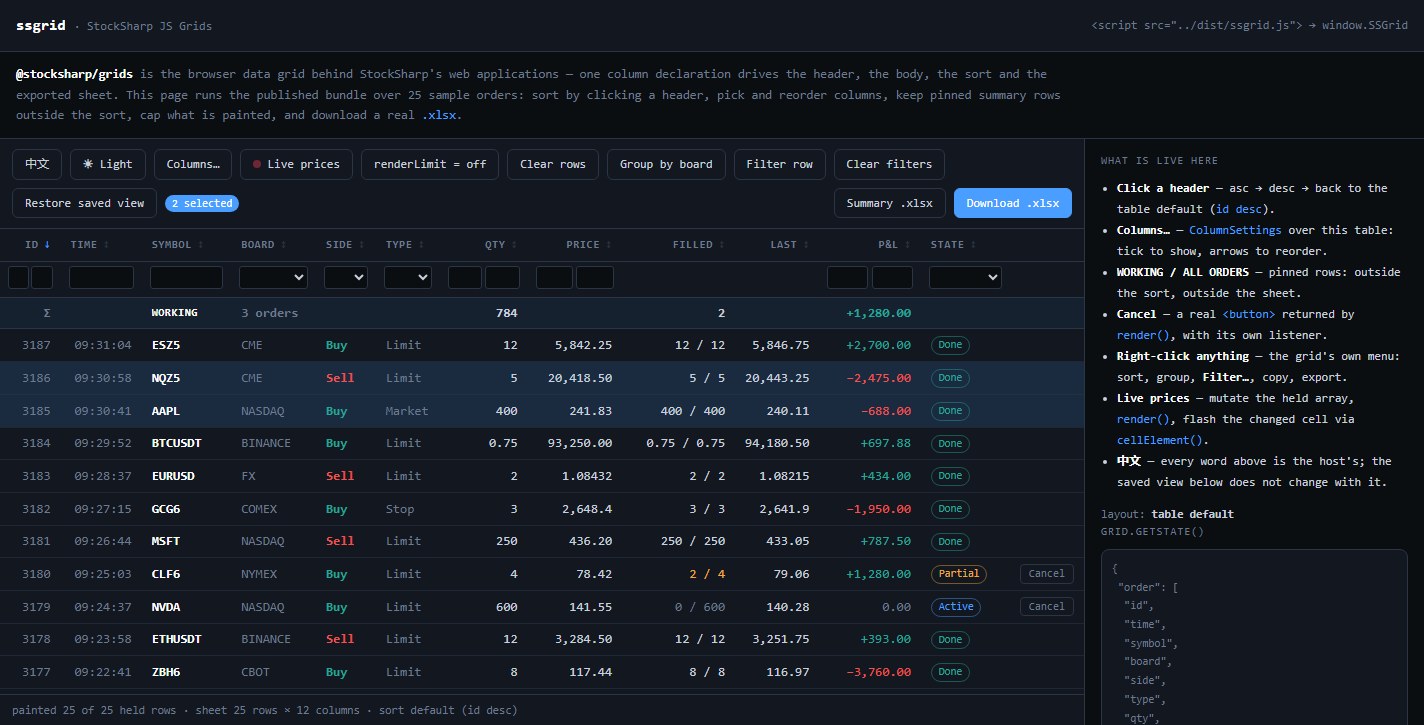
You can try the ready-made version in the online demo: headers sort rows, columns can be dragged and hidden, filters and grouping change the view, and export creates a real .xlsx file.
Package contents
- DataGrid builds the header and rows from a single column definition. It handles sorting, filters, grouping, row selection, pinned totals, the context menu, state persistence, and export.
- ColumnSettings attaches to an HTML table already rendered by the server and lets the user change the order and visibility of its columns.
- TableSort provides a standalone sorting controller for a table managed by the application.
- TableExport creates an OOXML
.xlsxworkbook without a third-party library.
DataGrid and ColumnSettings solve different tasks. The former creates the contents of <thead> and <tbody> itself from the column declarations. The latter does not create a table and is intended only for existing server-side markup with data-col attributes.
Installation
Install the package from npm:
npm install @stocksharp/grids
All main components are available from the common entry point:
import {
  DataGrid,
  ColumnSettings,
  TableSort,
  TableExport,
} from '@stocksharp/grids';
Separate entry points are provided to reduce the amount of imported code:
import { DataGrid } from '@stocksharp/grids/data-grid';
import { ColumnSettings } from '@stocksharp/grids/column-settings';
import { TableSort } from '@stocksharp/grids/table-sort';
import { TableExport } from '@stocksharp/grids/table-export';
Without a bundler, include the ready-made browser package. Its public objects are available through window.SSGrid:
<script src="https://cdn.jsdelivr.net/npm/@stocksharp/grids@1/dist/ssgrid.js"></script>
<script>
  const { DataGrid, TableExport } = window.SSGrid;
</script>
The @1 range takes the latest version of the first major branch. Pinning an exact number is worth it only when a build is reproduced deliberately: a pinned old version silently gives out a build without the features added since, and the absence of, say, groupOrder will show up somewhere other than where this tag is written.
The raw TypeScript sources are available through the @stocksharp/grids/source and @stocksharp/grids/source/<module> subpaths — they are needed when the grids are built by your own bundler in one pass with the rest of the code.
Quick example
Prepare a regular table with header and data sections:
<table id="orders">
  <thead></thead>
  <tbody></tbody>
</table>
Describe the columns once and pass the rows to the grid:
import { DataGrid, SortDirections } from '@stocksharp/grids';

interface Order {
  id: number;
  symbol: string;
  price: number;
}

const table = document.querySelector<HTMLTableElement>('#orders')!;
const grid = new DataGrid<Order>({
  head: table.tHead!,
  body: table.tBodies[0],
  columns: [
    { key: 'id', header: 'No.', value: order => order.id, filter: 'number', exportable: true },
    { key: 'symbol', header: 'Instrument', value: order => order.symbol, filter: 'text', exportable: true },
    { key: 'price', header: 'Price', value: order => order.price, filter: 'number', exportable: true },
  ],
  defaultSort: { col: 'id', dir: SortDirections.Desc },
  rowKey: order => String(order.id),
  emptyText: 'No orders',
  locale: 'en-US',
});

grid.setRows([
  { id: 101, symbol: 'SBER', price: 312.45 },
  { id: 102, symbol: 'GAZP', price: 164.18 },
]);
The library creates DOM elements but does not impose a visual design. The application stylesheet defines colors, dimensions, row highlighting, menus, the filter dialog, and utility classes.
Building from source
The repository and local demo use standard npm commands:
git clone https://github.com/StockSharp/JS-Grids.git
cd JS-Grids
npm ci
npm test
npm run build
npm run serve
Once started, the demo is available at http://localhost:8793/demo/.