
买卖面板集合
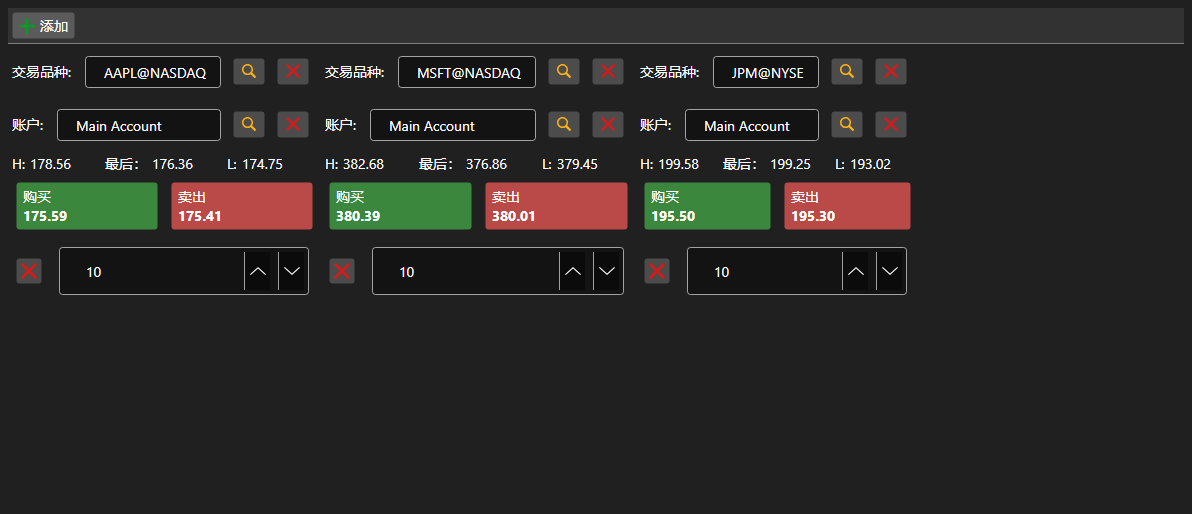
BuySellGrid - 由多个 BuySellPanel 组成的容器,每个标的一个面板,可在一个界面上交易多个标的。
主要属性
- BuySellGrid.SecurityProvider - 面板中用于选择的标的提供者。
- BuySellGrid.Portfolios - 投资组合来源。
- BuySellGrid.MarketDataProvider - 面板获取最优报价的行情提供者。
- BuySellGrid.Panels - 当前的面板集合。
面板通过 BuySellGrid.AddPanel 添加,通过 BuySellGrid.RemovePanel 移除。容器不注册订单,而是触发带有标的、投资组合、方向、价格和数量的 OrderRegistering 事件。面板组成通过 Save 和 Load 保存与恢复。
下面是其使用的代码片段:
<Window x:Class="Sample.BuySellWindow"
	xmlns="http://schemas.microsoft.com/winfx/2006/xaml/presentation"
	xmlns:x="http://schemas.microsoft.com/winfx/2006/xaml"
	xmlns:xaml="http://schemas.stocksharp.com/xaml"
	Height="400" Width="900">
	<xaml:BuySellGrid x:Name="BuySellGrid" />
</Window>
// 为所有面板设置数据源
BuySellGrid.SecurityProvider = _connector;
BuySellGrid.MarketDataProvider = _connector;
BuySellGrid.Portfolios = new PortfolioDataSource(_connector);

// 按标的添加面板
BuySellGrid.AddPanel(_security);

// 注册面板生成的订单
BuySellGrid.OrderRegistering += (security, portfolio, side, price, volume) =>
{
	_connector.RegisterOrder(new Order
	{
		Security = security,
		Portfolio = portfolio,
		Side = side,
		Price = price,
		Volume = volume,
	});
};