
売買パネルのセット
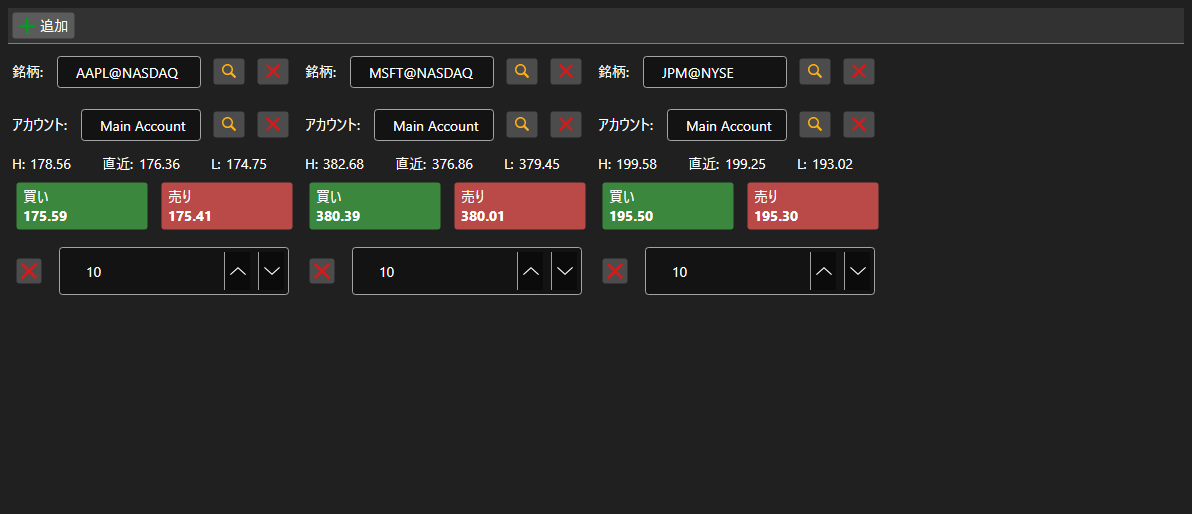
BuySellGrid - 銘柄ごとに 1 つずつ配置した複数の BuySellPanel のコンテナです。1 画面から複数銘柄を取引できます。
主なプロパティ
- BuySellGrid.SecurityProvider - パネルでの選択に使う銘柄プロバイダ。
- BuySellGrid.Portfolios - ポートフォリオのソース。
- BuySellGrid.MarketDataProvider - パネルが最良気配を取得するマーケットデータプロバイダ。
- BuySellGrid.Panels - 現在のパネルの集合。
パネルは BuySellGrid.AddPanel で追加し、BuySellGrid.RemovePanel で削除します。コンテナは注文を登録せず、銘柄・ポートフォリオ・売買方向・価格・数量を伴う OrderRegistering イベントを発生させます。パネル構成は Save と Load で保存・復元されます。
以下は使用例のコード断片です:
<Window x:Class="Sample.BuySellWindow"
	xmlns="http://schemas.microsoft.com/winfx/2006/xaml/presentation"
	xmlns:x="http://schemas.microsoft.com/winfx/2006/xaml"
	xmlns:xaml="http://schemas.stocksharp.com/xaml"
	Height="400" Width="900">
	<xaml:BuySellGrid x:Name="BuySellGrid" />
</Window>
// すべてのパネルのデータソースを設定します
BuySellGrid.SecurityProvider = _connector;
BuySellGrid.MarketDataProvider = _connector;
BuySellGrid.Portfolios = new PortfolioDataSource(_connector);

// 銘柄ごとのパネルを追加します
BuySellGrid.AddPanel(_security);

// パネルが作成した注文を登録します
BuySellGrid.OrderRegistering += (security, portfolio, side, price, volume) =>
{
	_connector.RegisterOrder(new Order
	{
		Security = security,
		Portfolio = portfolio,
		Side = side,
		Price = price,
		Volume = volume,
	});
};