
Buy/Sell panel set
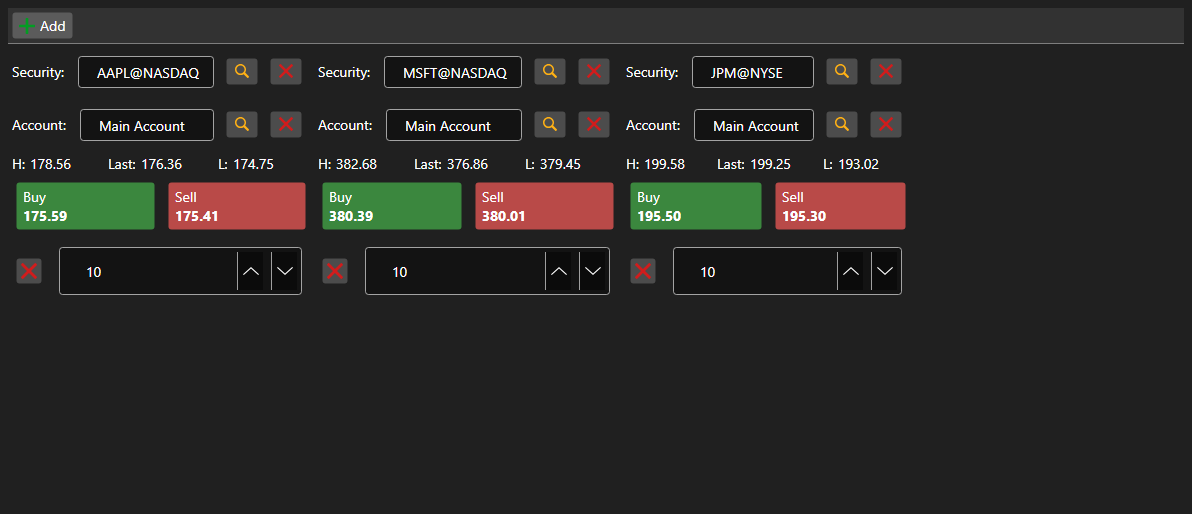
BuySellGrid - a container of several BuySellPanel panels - one per security. It allows trading several securities from a single screen.
Main properties
- BuySellGrid.SecurityProvider - security provider used for selection in the panels.
- BuySellGrid.Portfolios - portfolio source.
- BuySellGrid.MarketDataProvider - market data provider the panels take best prices from.
- BuySellGrid.Panels - current set of panels.
Panels are added by BuySellGrid.AddPanel and removed by BuySellGrid.RemovePanel. The container does not register orders - it raises OrderRegistering with the security, portfolio, side, price and volume. The set of panels is persisted and restored by Save and Load.
Below are code snippets showing its usage:
<Window x:Class="Sample.BuySellWindow"
	xmlns="http://schemas.microsoft.com/winfx/2006/xaml/presentation"
	xmlns:x="http://schemas.microsoft.com/winfx/2006/xaml"
	xmlns:xaml="http://schemas.stocksharp.com/xaml"
	Height="400" Width="900">
	<xaml:BuySellGrid x:Name="BuySellGrid" />
</Window>
// Set the data sources for all panels
BuySellGrid.SecurityProvider = _connector;
BuySellGrid.MarketDataProvider = _connector;
BuySellGrid.Portfolios = new PortfolioDataSource(_connector);

// Add a panel for the security
BuySellGrid.AddPanel(_security);

// Register the order built by the panel
BuySellGrid.OrderRegistering += (security, portfolio, side, price, volume) =>
{
	_connector.RegisterOrder(new Order
	{
		Security = security,
		Portfolio = portfolio,
		Side = side,
		Price = price,
		Volume = volume,
	});
};