
Storage settings
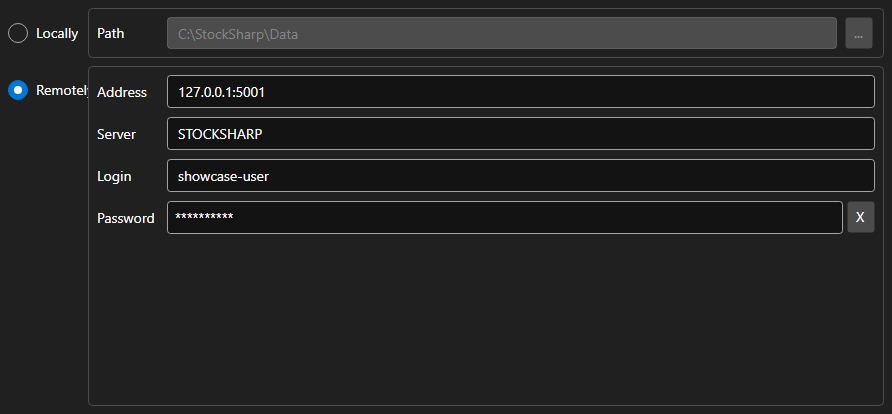
StorageSettingsPanel - a panel that selects the market data storage. It switches between a local folder and a remote server and sets the parameters of the chosen option.
Main properties
- StorageSettingsPanel.IsLocal - use the local storage.
- StorageSettingsPanel.Path - path to the local storage folder.
- StorageSettingsPanel.Address - address of the remote server.
- StorageSettingsPanel.Login - user name for the remote server.
- StorageSettingsPanel.IsCredentialsEnabled - availability of the login and password fields.
Any change raises the SettingsChanged event, which the application uses to recreate the IMarketDataDrive.
Below are code snippets showing its usage:
<Window x:Class="Sample.StorageWindow"
	xmlns="http://schemas.microsoft.com/winfx/2006/xaml/presentation"
	xmlns:x="http://schemas.microsoft.com/winfx/2006/xaml"
	xmlns:xaml="http://schemas.stocksharp.com/xaml"
	Height="300" Width="500">
	<xaml:StorageSettingsPanel x:Name="StoragePanel" />
</Window>
// Choose the local folder
StoragePanel.IsLocal = true;
StoragePanel.Path = @"C:\Data";

// Mark the settings as changed
StoragePanel.SettingsChanged += () => _isModified = true;

// Create the storage from the panel settings
var drive = StoragePanel.IsLocal
	? new LocalMarketDataDrive(StoragePanel.Path)
	: (IMarketDataDrive)new RemoteMarketDataDrive(StoragePanel.Address.To<EndPoint>());