
ストレージ設定
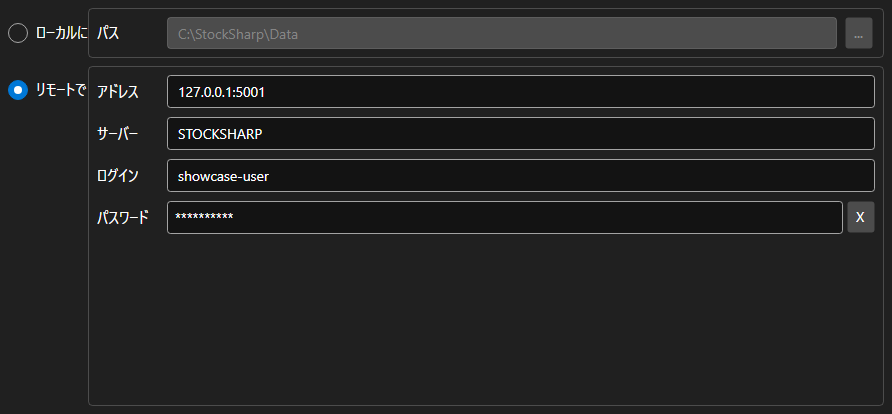
StorageSettingsPanel - マーケットデータの保存先を選ぶパネルです。ローカルフォルダーとリモートサーバーを切り替え、選んだ方のパラメータを設定します。
主なプロパティ
- StorageSettingsPanel.IsLocal - ローカルストレージを使うかどうか。
- StorageSettingsPanel.Path - ローカルストレージのフォルダーパス。
- StorageSettingsPanel.Address - リモートサーバーのアドレス。
- StorageSettingsPanel.Login - リモートサーバーのユーザー名。
- StorageSettingsPanel.IsCredentialsEnabled - ログインとパスワードの入力欄を使えるかどうか。
変更があるたびに SettingsChanged イベントが発生し、アプリケーションはそれを受けて IMarketDataDrive を作り直します。
以下は使用例のコード断片です:
<Window x:Class="Sample.StorageWindow"
	xmlns="http://schemas.microsoft.com/winfx/2006/xaml/presentation"
	xmlns:x="http://schemas.microsoft.com/winfx/2006/xaml"
	xmlns:xaml="http://schemas.stocksharp.com/xaml"
	Height="300" Width="500">
	<xaml:StorageSettingsPanel x:Name="StoragePanel" />
</Window>
// ローカルフォルダーを選びます
StoragePanel.IsLocal = true;
StoragePanel.Path = @"C:\Data";

// 設定が変更されたことを記録します
StoragePanel.SettingsChanged += () => _isModified = true;

// パネルの設定からストレージを作成します
var drive = StoragePanel.IsLocal
	? new LocalMarketDataDrive(StoragePanel.Path)
	: (IMarketDataDrive)new RemoteMarketDataDrive(StoragePanel.Address.To<EndPoint>());