
导入设置
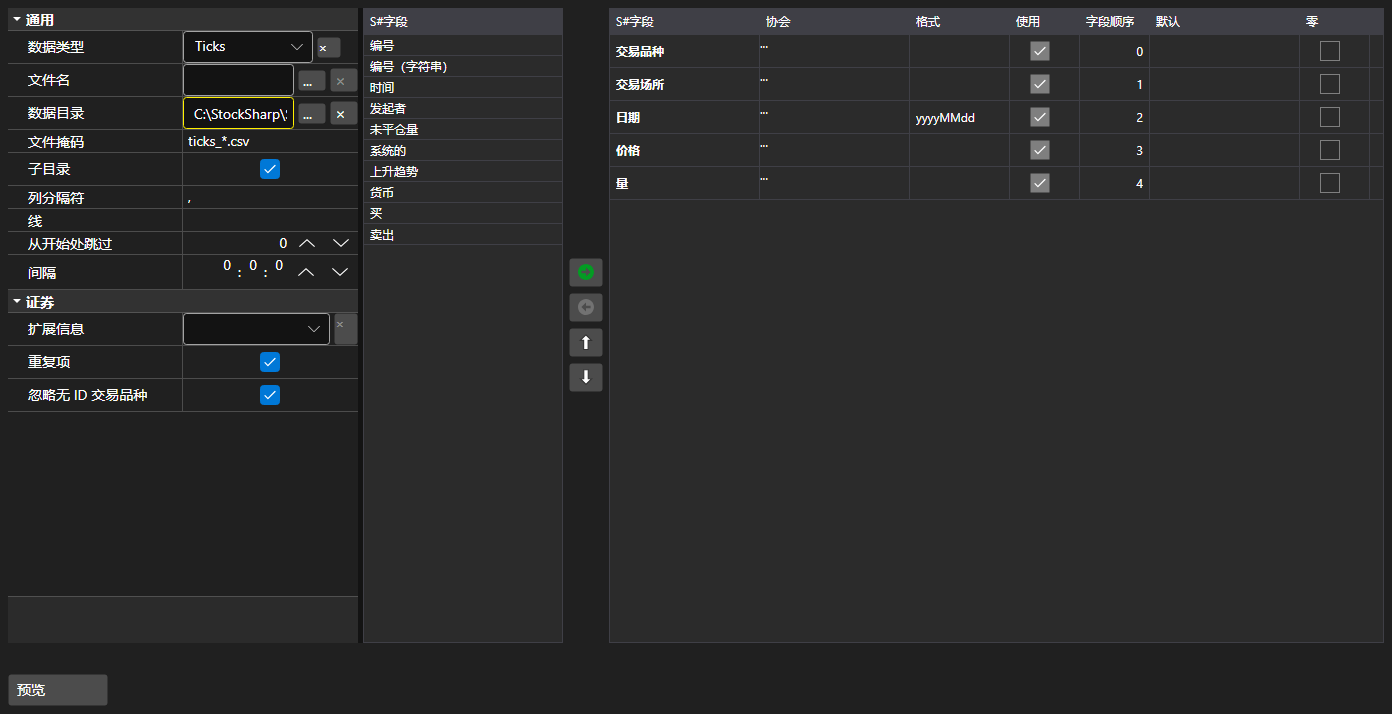
ImportSettingsPanel - 用于配置从文本文件导入数据的面板。设置分隔符、日期时间格式、编码,最重要的是列的组成与顺序。
主要属性
- ImportSettingsPanel.Settings - 导入设置。
- ImportSettingsPanel.SelectedFields - 按文件中出现顺序排列的已选字段。
- ImportSettingsPanel.UnSelectedFields - 文件中不包含的字段。
字段在两个列表之间移动,并上下调整顺序,直到与文件中的列顺序一致。ImportSettingsPanel.HasErrors 方法会在导入开始前校验设置。
下面是其使用的代码片段:
<Window x:Class="Sample.ImportWindow"
	xmlns="http://schemas.microsoft.com/winfx/2006/xaml/presentation"
	xmlns:x="http://schemas.microsoft.com/winfx/2006/xaml"
	xmlns:xaml="http://schemas.stocksharp.com/xaml"
	Height="600" Width="900">
	<xaml:ImportSettingsPanel x:Name="ImportPanel" />
</Window>
// 配置逐笔数据的导入
ImportPanel.Settings = new ImportSettings(DataType.Ticks, fields);

// 设置有误时不启动导入
if (ImportPanel.HasErrors())
	return;

// 根据配置好的字段创建解析器
var parser = new CsvParser(ImportPanel.Settings.DataType, ImportPanel.SelectedFields);