
Strategy statistics
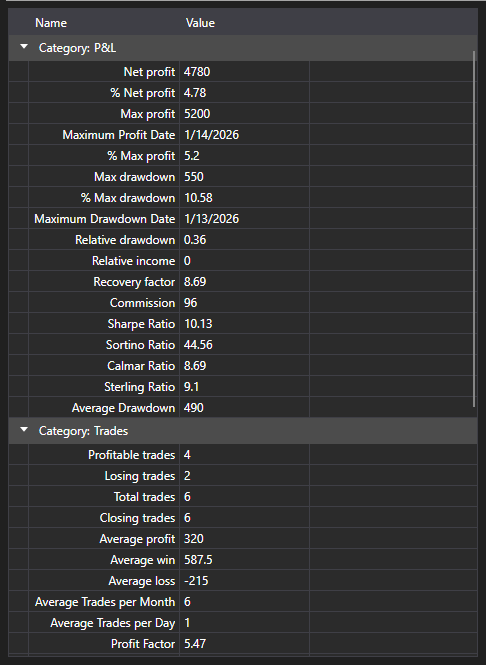
StatisticParameterGrid - a table of the IStatisticParameter statistics parameters of a single strategy. The parameters are grouped by category (trades, orders, return, drawdown), and every row shows the name, the current value and the description.
Main properties and methods
- StatisticParameterGrid.StatisticManager - the statistics manager whose parameters the table shows. Usually it is Strategy.StatisticManager.
- StatisticParameterGrid.Parameters - the list of parameters, when it is set directly rather than through the manager.
- StatisticParameterGrid.Reset - resets the accumulated values.
The values are updated as the strategy runs, so the table is placed next to the chart: the chart shows how the trading went, the table shows what it cost. Before running the same calculation again you have to call Reset, otherwise the new values will be laid over the old ones.
Unlike StrategiesStatisticsPanel, which compares several strategies over the same columns, this table breaks down one strategy in full.
Below are code snippets showing its usage:
<Window x:Class="Sample.StatisticsWindow"
	xmlns="http://schemas.microsoft.com/winfx/2006/xaml/presentation"
	xmlns:x="http://schemas.microsoft.com/winfx/2006/xaml"
	xmlns:xaml="http://schemas.stocksharp.com/xaml"
	Height="500" Width="400">
	<xaml:StatisticParameterGrid x:Name="StatisticGrid" />
</Window>
// Show the statistics of the strategy
StatisticGrid.StatisticManager = _strategy.StatisticManager;

// Reset the accumulated values before running again
StatisticGrid.Reset();