
Compilation errors
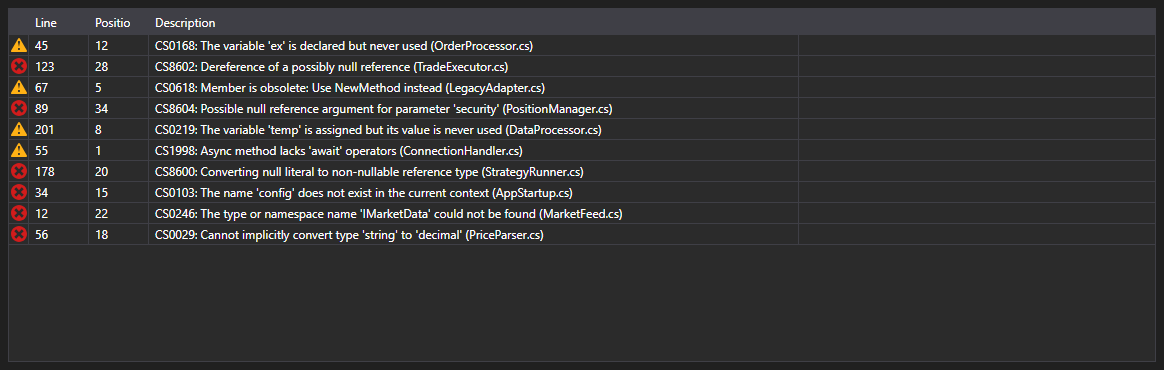
ErrorsGrid - a table of compilation errors. For every CompilationError entry it shows the kind (error, warning, message), the line, the position in the line and the text.
Main properties
- ErrorsGrid.Errors - list of compilation errors.
The ErrorSelected event is raised on a double click on a row - the code editor uses it to move the caret to that line. This is how the table and the editor form the usual pair of an error list and a jump to the error.
Below are code snippets showing its usage:
<Window x:Class="Sample.CompilationWindow"
	xmlns="http://schemas.microsoft.com/winfx/2006/xaml/presentation"
	xmlns:x="http://schemas.microsoft.com/winfx/2006/xaml"
	xmlns:code="clr-namespace:StockSharp.Xaml.Code;assembly=StockSharp.Xaml"
	Height="200" Width="800">
	<code:ErrorsGrid x:Name="ErrorsGrid" />
</Window>
// Show the compilation result
var result = compiler.Compile("Strategy", sources, references);

ErrorsGrid.Errors.Clear();
ErrorsGrid.Errors.AddRange(result.Errors);

// Jump to the line with the error on a double click
ErrorsGrid.ErrorSelected += error => CodePanel.Code.SelectLine(error.Line);