
Settings
The Settings page is opened with the tab of the same name at the top of the Installer window.
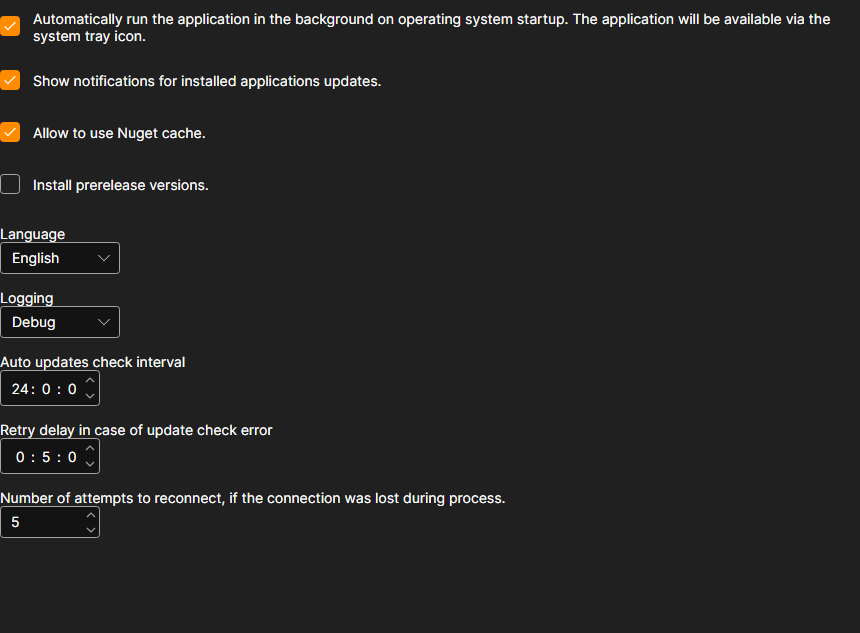
What can be changed here
- Automatically run the application in the background on operating system startup. Installer starts together with Windows and stays in the notification area, from where it has to be closed — the cross in the window does not shut the program down.
- Show notifications for installed applications updates. Without this check box, Installer keeps checking for updates, but silently: you can only learn about them on the applications page. See Update apps for how it looks.
- Allow to use Nuget cache. Packages already downloaded on this machine are taken from the disk instead of the network. This speeds up a repeated installation; turn it off if you need to be sure the package is downloaded again.
- Install prerelease versions. Besides the regular releases, preliminary builds are offered. Turn it on only if you understand why you need a version that has not been released yet.
- Language. The interface language of Installer itself.
- Logging. How detailed the log is. The records are shown on the Logs page; when contacting support, a detailed level helps to find the cause faster.
- Auto updates check interval. How often Installer asks the server about new versions, in hours.
- Retry delay in case of update check error. How long to wait before repeating a failed download, in minutes.
- Number of attempts to reconnect, if the connection was lost during process. How many times Installer tries to finish downloading a package before reporting an error.
The changes are applied at once and saved — there is no separate save button.