
Position changes
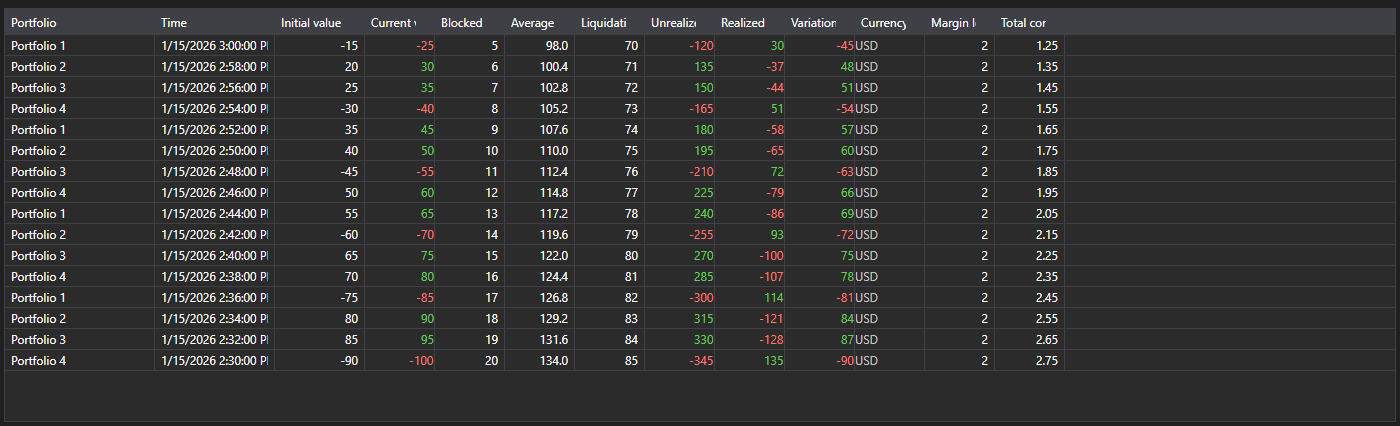
PositionChangeGrid - a table of PositionChangeMessage messages. Unlike the portfolio table it shows not the current state but the stream of changes: every row is a separate message with the set of changed values.
Main properties
- PositionChangeGrid.Messages - list of position change messages.
- PositionChangeGrid.SelectedMessage - selected message.
- PositionChangeGrid.SelectedMessages - selected messages.
- PositionChangeGrid.MaxCount - maximum number of rows in the table; the oldest rows are removed once it is exceeded.
Such a stream is handy when investigating discrepancies: you see which value the connector sent and when, not only the final result.
Below are code snippets showing its usage:
<Window x:Class="Sample.PositionChangesWindow"
	xmlns="http://schemas.microsoft.com/winfx/2006/xaml/presentation"
	xmlns:x="http://schemas.microsoft.com/winfx/2006/xaml"
	xmlns:xaml="http://schemas.stocksharp.com/xaml"
	Height="400" Width="900">
	<xaml:PositionChangeGrid x:Name="PositionChangeGrid" />
</Window>
// Receive position changes from the connector
_connector.PositionReceived += (subscription, position) =>
{
	var message = position.ToChangeMessage();

	// Add the message to the table on the user interface thread
	this.GuiAsync(() => PositionChangeGrid.Messages.Add(message));
};

// Create the position changes subscription
_connector.Subscribe(new Subscription(DataType.PositionChanges));