
创建指标
有关在 API 中创建自定义指标的方法,请参阅自定义指标。此类指标与 Designer 完全兼容。
要创建指标,请在 策略图 面板中选择 指标 文件夹,右键单击该文件夹,然后在上下文菜单中选择 添加:
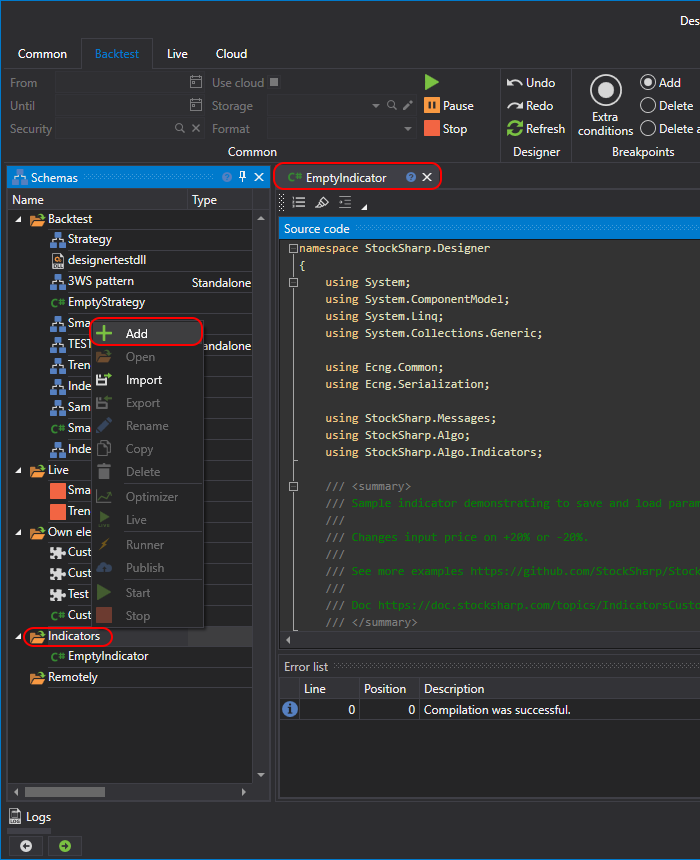
指标代码如下:
/// <summary>
/// 演示如何保存和加载参数的示例指标。
/// 将输入价格改变 +20% 或 -20%。
///
/// 更多示例:
/// https://github.com/StockSharp/StockSharp/tree/master/Algo/Indicators
///
/// 文档:
/// https://doc.stocksharp.com/topics/designer/strategies/using_code/fsharp/create_own_indicator.html
/// </summary>
type EmptyIndicator() as this =
	inherit BaseIndicator()

	// 内部字段
	let mutable changeValue = 20
	let mutable counter = 0
	let mutable isFormedValue = false

	/// <summary>
	/// 用于调整输入价格的百分比值(+/-)。
	/// </summary>
	member this.Change
		with get () = changeValue
		and set value =
			changeValue <- value
			this.Reset()

	/// <summary>
	/// 指示指标是否已形成(已可用于交易)。
	/// </summary>
	override this.CalcIsFormed() = isFormedValue

	/// <summary>
	/// 将指标重置为初始状态。
	/// </summary>
	override this.Reset() =
		base.Reset()
		isFormedValue <- false
		counter <- 0

	/// <summary>
	/// 处理输入值的主要逻辑。
	/// </summary>
	override this.OnProcess(input: IIndicatorValue) : IIndicatorValue =
		// 每第 10 次调用尝试返回“空”值
		if RandomGen.GetInt(0, 10) = 0 then
			// 空值仍只包含时间,不包含实际数据
			DecimalIndicatorValue(this, input.Time)
		else
			// 每次调用时递增计数器
			counter <- counter + 1

			// 收到 5 个输入后,指标视为已形成
			if counter = 5 then
				isFormedValue <- true

			let mutable value = input.ToDecimal()

			// 按 +/- Change% 随机改变
			let randomFactor = decimal (RandomGen.GetInt(-changeValue, changeValue)) / 100m
			value <- value + (value * randomFactor)

	// 返回最终指标值
			let result = DecimalIndicatorValue(this, value, input.Time)
			// 随机将其标记为最终值或非最终值
			result.IsFinal <- RandomGen.GetBool()
			result

	/// <summary>
	/// 从指定的 <see cref="SettingsStorage"/> 加载指标设置。
	/// </summary>
	override this.Load(storage: SettingsStorage) =
		base.Load(storage)
		this.Change <- storage.GetValue<int>(nameof(this.Change))

	/// <summary>
	/// 将指标设置保存到指定的 <see cref="SettingsStorage"/>。
	/// </summary>
	override this.Save(storage: SettingsStorage) =
		base.Save(storage)
		storage.SetValue(nameof(this.Change), this.Change)

	/// <summary>
	/// 包含当前 <see cref="Change"/> 值的字符串表示。
	/// </summary>
	override this.ToString() =
		sprintf "变化: %d" this.Change
该指标接收输入值,并根据 变化 参数对该值进行随机偏移。
有关指标方法的说明,请参阅自定义指标。
要将创建的指标添加到策略图,请使用 指标 模块,并在其中选择所需指标:
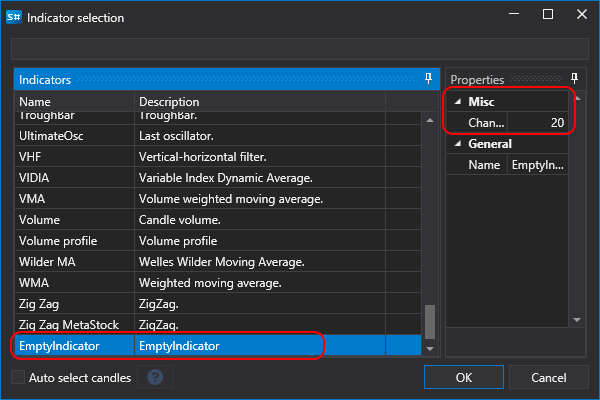
属性面板会显示此前在指标代码中定义的 变化 参数。
Warning
使用 F# 代码创建的指标不能用于同样使用 F# 代码创建的策略,只能用于通过模块创建的策略。