
ストラテジーギャラリー
戦略ギャラリー では、既製の取引ストラテジーをコンピューターにダウンロードできます。共通 タブの 戦略ギャラリー ボタンをクリックすると、戦略ギャラリー を開くことができます。
ストラテジーをコンピューターにダウンロードするには、次の操作が必要です:
目的のストラテジーを選択し、ダウンロードボタンをクリックします:
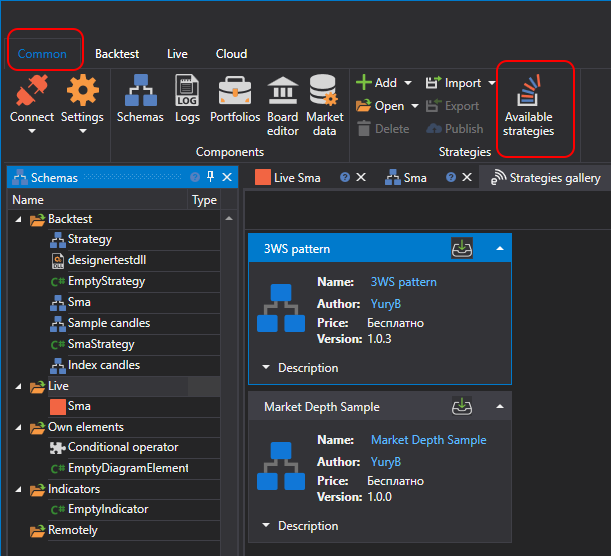
ストラテジーが バックテスト セクションのストラテジーツリーに追加されます:
戦略ギャラリー では、既製の取引ストラテジーをコンピューターにダウンロードできます。共通 タブの 戦略ギャラリー ボタンをクリックすると、戦略ギャラリー を開くことができます。
ストラテジーをコンピューターにダウンロードするには、次の操作が必要です:
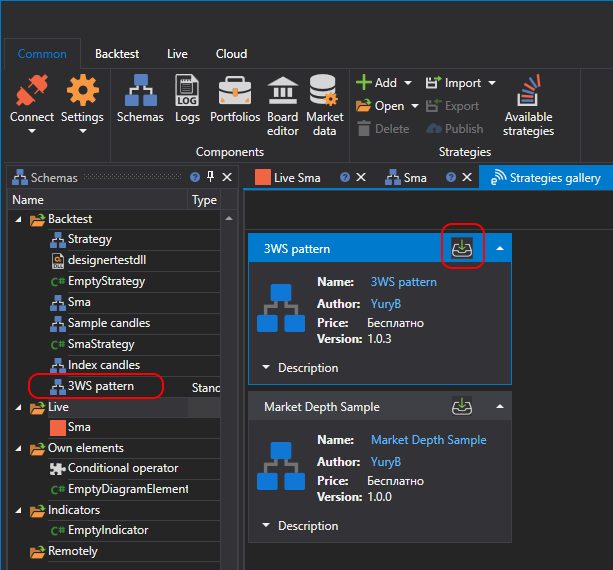
目的のストラテジーを選択し、ダウンロードボタンをクリックします:
ストラテジーが バックテスト セクションのストラテジーツリーに追加されます: