
Anotaciones
S# proporciona la posibilidad de agregar anotaciones al gráfico en forma de texto, líneas, etc.
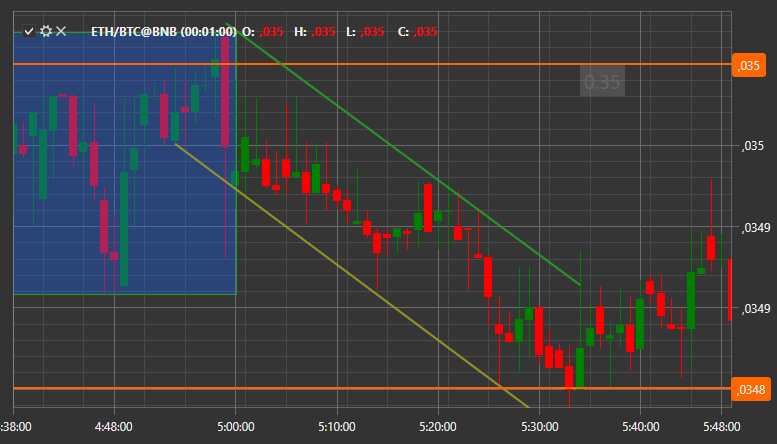
Las anotaciones se agregan de la misma manera que cualquier otra información al gráfico. Primero debe crear ChartAnnotation y agregarlo al área del gráfico:
var _annotation = new ChartAnnotation { Type = ChartAnnotationTypes.BoxAnnotation };
Chart.AddElement(chartArea, _annotation);
Después, debe inicializar una nueva instancia de la clase AnnotationData, describir en ella la anotación y pasarla al método IChart.Draw**(**datos StockSharp.Charting.IChartDrawData ) para dibujarla en el gráfico:
var data = new ChartDrawData.AnnotationData
{
	X1 = new DateTimeOffset(2017, 10, 02, 8, 30, 0, TimeSpan.FromHours(1)),
	X2 = new DateTimeOffset(2017, 10, 02, 10, 30, 0, TimeSpan.FromHours(1)),
	Y1 = 193.5m,
	Y2 = 194m,
	IsVisible = true,
	Stroke = new SolidColorBrush(Color.FromRgb(0, 0, 255)),
	Thickness = new Thickness(3),
	Text = "Nueva anotación",
	HorizontalAlignment = HorizontalAlignment.Stretch,
	VerticalAlignment = VerticalAlignment.Stretch,
	LabelPlacement = LabelPlacement.Axis,
	ShowLabel = true,
	CoordinateMode = AnnotationCoordinateMode.Absolute,
};
var drawData = new ChartDrawData();
drawData.Add(_annotation, data);
Chart.Draw(drawData);