本页面尚未提供您的语言版本,显示其他语言版本。
Components
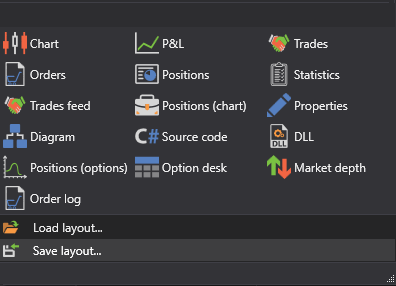
During trading, you may need to fully control the process. For complete control and analysis, Terminal provides graphical components that you can add by selecting them in the Components group of the Ribbon:

- Instruments - is a table with instruments that displays information about all selected instruments.
- Level 1 - is a table with a history of changing Level 1 for the selected instruments.
- Buy/Sell - is a panel group that displays the best price information for the selected instruments, and it allows you to buy or sell the required volume for the selected instruments.
- Order book - is a table of limit orders for purchase and sale.
- Chart - allows you to draw candles and indicators for the selected instrument.
- P&L equity - is a chart of Profit/Loss (unrealized), Profit/Loss (realized) and commission.
- Trades - is a table with trades, that displays complete information about all trades of the strategy.
- Orders - is a table with orders, that displays complete information about all orders of the strategy.
- Conditional orders - is a table with conditional orders, that displays complete information about all conditional orders of the strategy.
- Positions - is a table of the current Position.
- Tick trades - is a trade table that displays complete information about all trades for the selected instruments.
- Positions - is a chart of the Position.
- News - displays news received from connections.
- Positions (options) - is a graphic display of the position by options.
- Option desk - is a table of the main parameters of the selected options for the underlying instrument.
- Smile volatility - is a graphic representation of the expected volatility level for options with the same underlying asset and different strikes.
- Order log - is a table with orders, which displays complete information about all orders for the selected instruments.