本页面尚未提供您的语言版本,显示其他语言版本。
Simulator
Designer allows running the created strategies in the Simulation mode, to customize the Simulation, the following actions shall be performed:
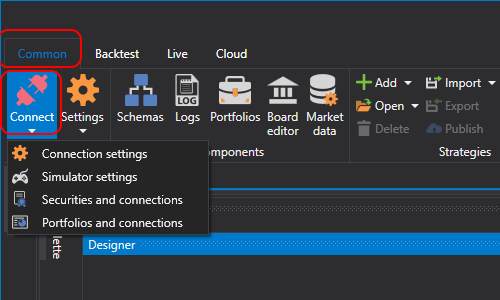
- When clicking the arrow next to the Connect
button, the Emulator settings button appears:

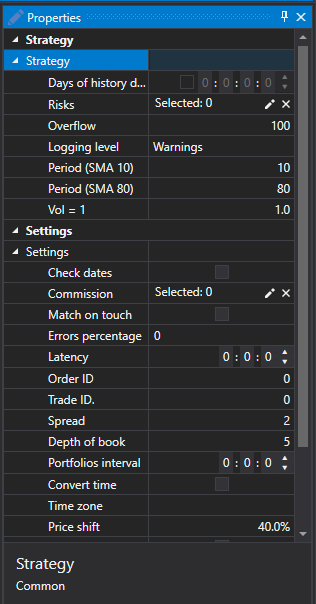
- When clicking the Emulator settings button, the Emulator settings window opens:

- Simulator
- Use emulator – Use emulator.
- Instruments – Instruments.
- Settings
- Combine on touch - During emulation, combine trades when the trade price touches the order price (i.e., equals the order price).
- Market depth (lifetime) - Maximum time, during which the order book is in the emulator. If during this time there was no update, the order book is erased. This property can be used to remove old order books when there are holes in the data.
- Errors percentage - The percentage value of the error when registering new orders. Value may be from 0 (no errors at all) to 100.
- Latency - The minimum value of delay for registered orders.
- Reregistering - Is re-registration of orders in the form of a single trade supported?
- Buffering period - Send responses in batches in a single package. The network delay and the buffered work of the stock exchange core are emulated.
- Order ID - The number, starting from which, the emulator will generate the identifiers for orders.
- Trade ID - The number, starting from which, the emulator will generate the identifiers for trades.
- Transaction - The number, starting from which, the emulator will generate the identifiers for order transactions.
- Spread size - Spread size in price increments. Used in determining the spread for the order book generation from tick trades.
- Depth of book - The maximum depth of the order book, that will be generated from ticks.
- Number of volume steps - The number of volume steps, for which the order is larger than the tick trade. Used when testing tick trades.
- Portfolios interval - Portfolio recalculation interval. If the interval equals zero, no recalculation is performed.
- Change time - Change time for orders and trades with the stock exchange time.
- Time zone - Information on the stock exchange time zone.
- Price shift - Price shift from the last trade, determining boundaries of maximal and minimal prices for the next session.
- Add extra volume - Add extra volume to the book order when registering large volume orders.