本页面尚未提供您的语言版本,显示其他语言版本。

Export from Designer

Runner allows you to run strategies created in Designer. This is the most convenient way to set up Runner as all configurations are done visually.

To export a strategy from Designer:

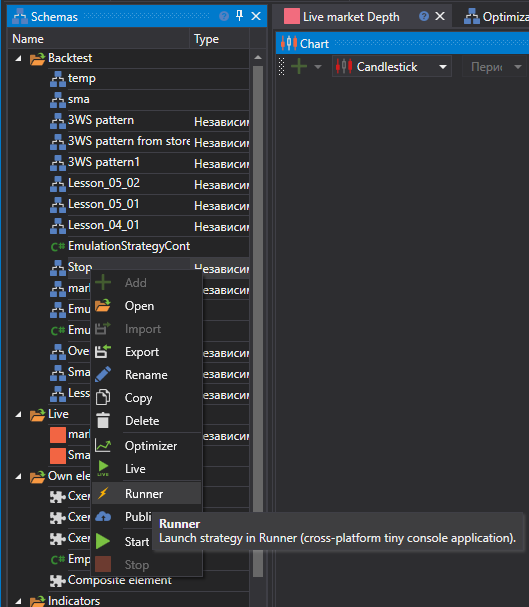
  • Select the desired strategy in the tree, right-click it, and choose the Runner menu item:

    Designer_Runner_1

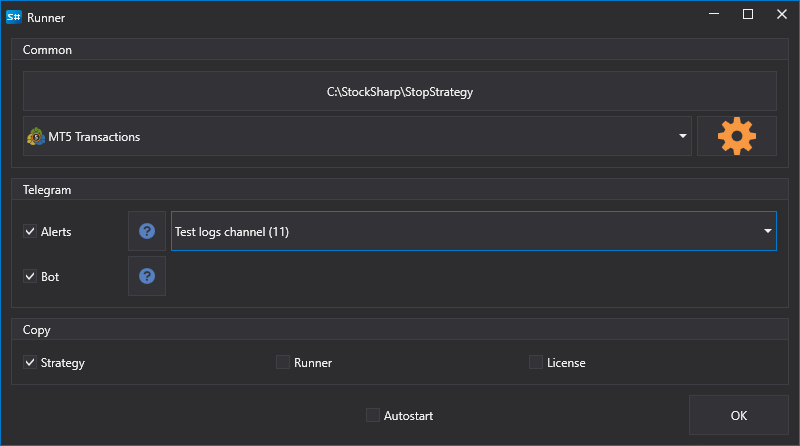
  • In the window that appears, you need to select which types of connections need to be exported to Runner, as well as settings for managing the strategy via Telegram:

    Designer_Runner_1

The following files will be copied to the selected export directory:

  • connector.json - a file containing connection settings
  • params.json - a file containing strategy parameters
  • start.bat - a bat file with a command line already written for quick Runner startup
  • strategy.json - a file containing the strategy
  • connector.json - a file containing connection settings
  • telegram.json - a file containing settings for integration with Telegram