
注文
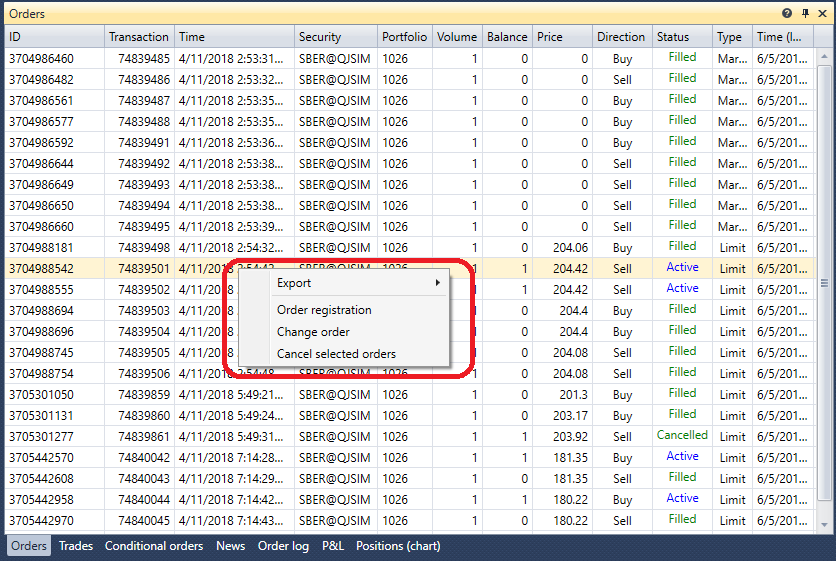
注文 コンポーネントは注文テーブルであり、すべての注文に関する完全な情報を表示します。注文上でマウスを右クリックすると、新しい注文の登録、選択した注文のキャンセルまたは変更を行えるパネルが表示されます。
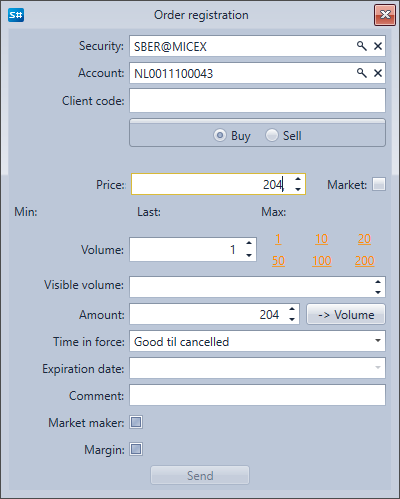
注文登録 ボタンをクリックすると、ウィンドウが表示されます。新しい注文を登録するには、内容を入力して 送信 をクリックします。
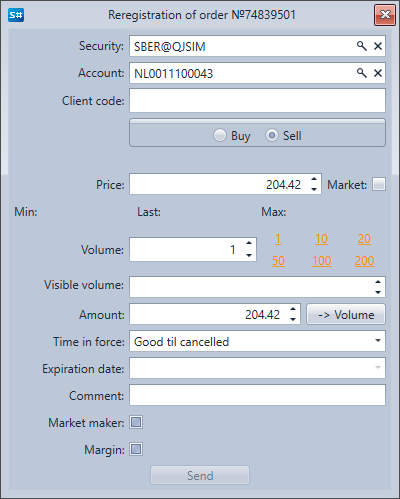
注文変更 ボタンをクリックすると、ウィンドウが表示されます。注文を変更するには、必要な変更を行い、送信 をクリックします。
注文 コンポーネントは注文テーブルであり、すべての注文に関する完全な情報を表示します。注文上でマウスを右クリックすると、新しい注文の登録、選択した注文のキャンセルまたは変更を行えるパネルが表示されます。
注文登録 ボタンをクリックすると、ウィンドウが表示されます。新しい注文を登録するには、内容を入力して 送信 をクリックします。
注文変更 ボタンをクリックすると、ウィンドウが表示されます。注文を変更するには、必要な変更を行い、送信 をクリックします。